Participant
January 8, 2021
Answered

Conditional Formatting for Text Displayed & Fill Color

  • January 8, 2021
  • 1 reply
  • 533 views

Hello,

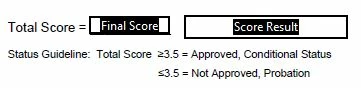
I am working on a vendor approval form and want to add a box (Score Result) that will change the text displayed and fill color depending on a calculated score (Final Score). I have tried a couple different JavaScripts but haven't been able to get them to work properly--this is my first time attempting JavaScript.

Basically, if the Final Score box has zero or no value, I need the Score Result box to show no text and no fill color. If the Final Score box has a value greater than or equal to 3.5, I need the Score Result box to show Approved with a green fill. If the Final Score box has a value of less than 3.5, I need the Score Result box to show Not Approved with a red fill.

Any advice is greatly appreciated! Thanks!
This topic has been closed for replies.
Correct answer Nesa Nurani

As custom calculation script of 'Score Result' you can use this:

var t1 = this.getField("Final Score").value;
if(t1 == "" || t1 == 0){
event.value = "";
event.target.fillColor = color.transparent;}
else if(t1 >= 3.5){
event.value = "Approved";
event.target.fillColor = color.green;}
else if(t1 < 3.5){
event.value = "Not Approved";
event.target.fillColor = color.red;}

1 reply

Nesa Nurani
Community Expert
Nesa NuraniCommunity ExpertCorrect answer
Community Expert
January 8, 2021

As custom calculation script of 'Score Result' you can use this:

var t1 = this.getField("Final Score").value;
if(t1 == "" || t1 == 0){
event.value = "";
event.target.fillColor = color.transparent;}
else if(t1 >= 3.5){
event.value = "Approved";
event.target.fillColor = color.green;}
else if(t1 < 3.5){
event.value = "Not Approved";
event.target.fillColor = color.red;}

Participant
January 8, 2021

That worked perfectly! Thank you so much!