
PFritz
Participating Frequently
Jan 31, 2017 5:38 PM UTC
Answered

Configuration error 213:11 with Adobe Acrobat DC

I have an end user with a 32-bit Windows 7 system that is getting the following error when opening Adobe Acrobat DC on his computer.:
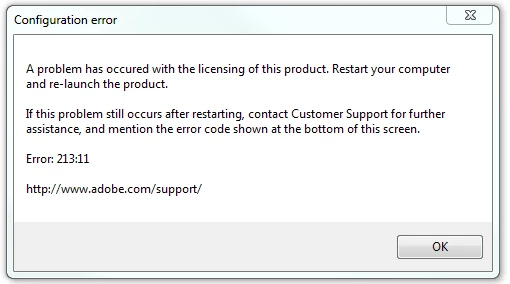
The user has no other Adobe products installed beyond the standard Reader/Flash/Shockwave/AIR applications.  It's a Classic install, not Continuous.  Repairing the install and uninstalling/reinstalling Acrobat DC did not resolve the issue.  The user does have admin rights to his machine.  I tried removing read-only from C:\ProgramData\Adobe\SLStore.

Based on searches on Google and the Adobe forums here, this is a common error message, but I could not find anyone running into the problem with Adobe Acrobat DC.  Thank you all for any assistance you can provide here.

This topic is closed to new replies. Start a new post to keep the conversation going.
Superhero_Jeff
Superhero_JeffCorrect answer
Participant
Jul 7, 2017 4:35 AM UTC

I had the same problem.  It was not the permissions issue stated at article linked above.  However, it was a good lead.  Here's how I fixed it:

  • Close Acrobat
  • Open the Run dialog box (Windows key+R)
  • Type in %appdata% and click OK
  • Open the Adobe folder
  • Delete the Adobe PCD folder
  • Delete the SLData folder
  • Open Acrobat

Issue fixed.

10 replies

Superhero_Jeff
Superhero_JeffCorrect answer
Participant
Jul 7, 2017 4:35 AM UTC

I had the same problem.  It was not the permissions issue stated at article linked above.  However, it was a good lead.  Here's how I fixed it:

  • Close Acrobat
  • Open the Run dialog box (Windows key+R)
  • Type in %appdata% and click OK
  • Open the Adobe folder
  • Delete the Adobe PCD folder
  • Delete the SLData folder
  • Open Acrobat

Issue fixed.

Translate
michaelb86676351
Participant
May 28, 2018 8:52 PM UTC

Thanks. Issue fixed

Translate
PFritz
PFritzAuthor
Participating Frequently
Feb 6, 2017 7:19 PM UTC

Settings the SLStore and Adobe PCD folders to no one be read-only did not resolve the issue.  Do you have any other suggestions, kglad?  Thanks.

Translate
kglad
Community Expert
Community Expert
Feb 6, 2017 7:49 PM UTC

permissions should be read/write.

if you followed the suggestions and they failed, using a browser that allows popups and cookies, contact adobe support during pst business hours by clicking here and, when available, click 'still need help', https://helpx.adobe.com/contact.html

Translate
kglad
Community Expert
Community Expert
Jan 31, 2017 6:00 PM UTC

restore permissions on both adobe pcd and slstore folders

https://helpx.adobe.com/creative-cloud/kb/configuration-error-cs5.html

Translate
PFritz
PFritzAuthor
Participating Frequently
Jan 31, 2017 10:23 PM UTC

C:\Program Files\Common Files\Adobe\Adobe PCD, correct?  The link did not specify that folders location in Windows, but I was able to find it doing a search for it in Explorer.

Translate
kglad
Community Expert
Community Expert
Jan 31, 2017 10:52 PM UTC

the (corrected) link in message 1 shows the the location of the two folders.

Translate