

mdwpsyd27
Inspiring
October 22, 2023
Answered

Configure signature appearance does not seem to work

  • October 22, 2023
  • 3 replies
  • 1743 views

I'm probably doing something wrong, but I cannot figure out what it is. I created a new "Appearance" under Edit > Preferences > Signatures > Creation & Appearance > More... > Appearances > New, which I titled "Standard":
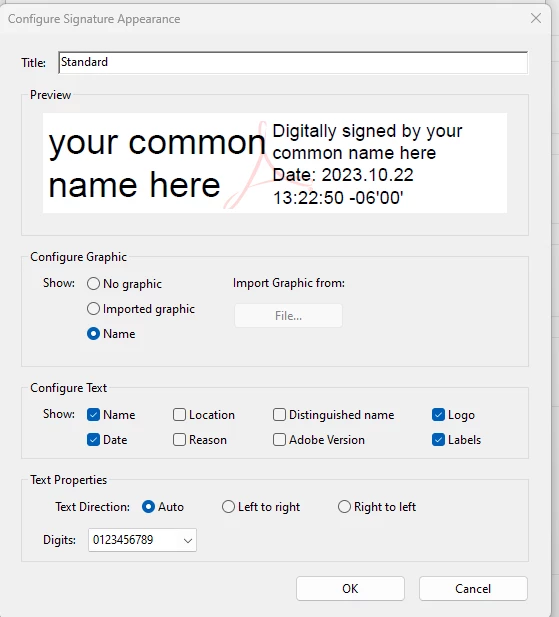


But when I attempt to digitally sign my own document (PDF) under Fill & Sign > Sign Yourself, the only options available are either a typed signature, which doesn't make sense, or an image of my actual signature. But I want it to look like the image above. How do I accomplish this? 


TIA,


Mark

This topic has been closed for replies.
Correct answer MikelKlink

As @Bernd Alheit already answered, the appearances your configured are for signatures created using Tools -> Certificates.

Signatures created using Tools -> Certificates are digital signatures that include a hash (a fingerprint) of the current document that is cryptographically post-processed to be uniquely linked to the holder of a so called private key. A document with this kind of signature, therefore, can be checked for changes after signing.

Signatures created using Fill & Sign -> Sign Yourself, on the other hand, are basic electronic signatures that merely are an image or a text drawn in the document without any further cryptographic features. A document with this kind of signature cannot be checked for changes after signing.

3 replies

MikelKlink
MikelKlinkCorrect answer
Participating Frequently
October 23, 2023

As @Bernd Alheit already answered, the appearances your configured are for signatures created using Tools -> Certificates.

Signatures created using Tools -> Certificates are digital signatures that include a hash (a fingerprint) of the current document that is cryptographically post-processed to be uniquely linked to the holder of a so called private key. A document with this kind of signature, therefore, can be checked for changes after signing.

Signatures created using Fill & Sign -> Sign Yourself, on the other hand, are basic electronic signatures that merely are an image or a text drawn in the document without any further cryptographic features. A document with this kind of signature cannot be checked for changes after signing.

mdwpsyd27
mdwpsyd27Author
Inspiring
October 23, 2023

Thank you both!  :0)

Mark D Worthen PsyD
Bernd Alheit
Community Expert
Community Expert
October 23, 2023

To sign the document use Tools > Certificates

mdwpsyd27
mdwpsyd27Author
Inspiring
October 22, 2023

P.S. Just in case it's relevant, I am using this version of Adobe Acrobat Pro:


Mark D Worthen PsyD