Participant
June 3, 2018
Answered

Conversion of Ms word to PDF

  • June 3, 2018
  • 2 replies
  • 2480 views

Hi all,

I created a help guide for ABC application in MS word. When i converted into PDF hyperlinks are not working. Also I need the contents page should be convert as PDF title haierarchy ?(which will should as hierarchy on left side for the original PDF document).

Please guide me on this

Thanks

[Here is the list of all Adobe forums... https://forums.adobe.com/welcome]

[Moved from Reader to an Acrobat forum... Mod]
This topic has been closed for replies.
Correct answer Dave__M

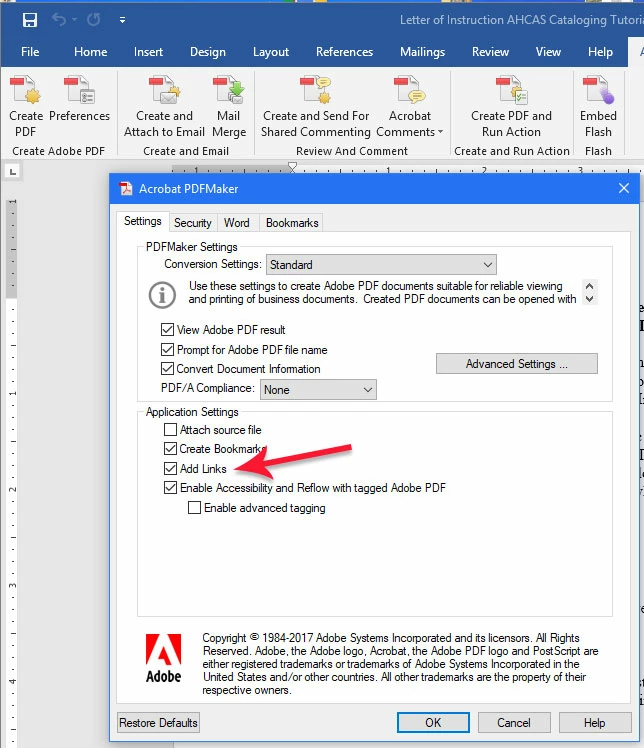
For the best results, I always recommend using the "PDF Maker" which is the Acrobat Ribbon in MS Word.  If you visit the Preferences button first, be sure that your Add Links feature is enabled.  Then use the Create PDF button.  You may already be doing this, but I find many folks use the Save as PDF feature of Word, which often yields a weak PDF, IMHO.

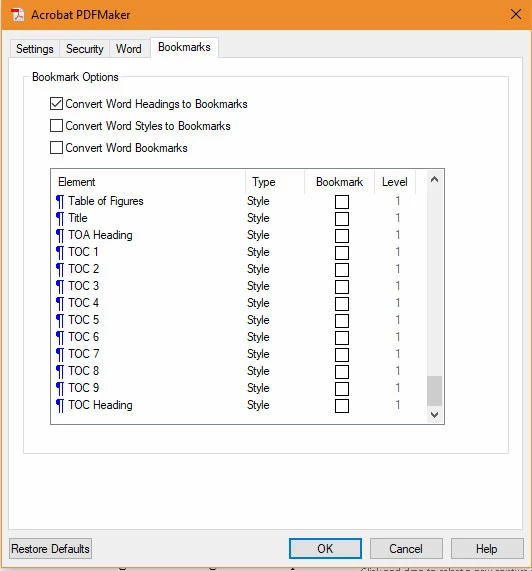
The PDF Maker will also allow you to choose a Word style and have it converted to PDF Bookmarks.  Find the setting also in the Preferences of the PDF Maker.  The TOC styles shown below would be helpful for your Table of Contents link needs.

I hope this is helpful.

My best,

Dave

2 replies

Inspiring
June 3, 2018

Very exactly how did you do the conversion?

The free Adobe Reader does not have the ability to convert an MS Word doc to a PDF. Adobe does sell a subscription web service for users of the free Adobe Reader to convert MS Word docs to PDFs, but you will need to pay for this added service.

If you want the target Word documents in the links to open as PDF files, you will first have to convert all those documents to PDFs, re-edit all the links to those documents and make then relative links to appropriate PDF file, and then re-convert all the Word documents with links into PDF files. Now when it comes time to move all the files you must retain the document and directory structure on the target location. If you want to use absolute locations for the targets of the links, then you will need to place all the PDF at the appropriate final location and hope the server on which they reside will never be renamed or have its base address changed.

John T Smith
Community Expert
Community Expert
June 3, 2018

I was not aware that the free Reader (where you posted this) could convert files

Are you using Reader, or Acrobat?

Participant
June 4, 2018

I am using Adobe Acrobat DC

Dave__M
Community Expert
Dave__MCommunity ExpertCorrect answer
Community Expert
June 4, 2018

For the best results, I always recommend using the "PDF Maker" which is the Acrobat Ribbon in MS Word.  If you visit the Preferences button first, be sure that your Add Links feature is enabled.  Then use the Create PDF button.  You may already be doing this, but I find many folks use the Save as PDF feature of Word, which often yields a weak PDF, IMHO.

The PDF Maker will also allow you to choose a Word style and have it converted to PDF Bookmarks.  Find the setting also in the Preferences of the PDF Maker.  The TOC styles shown below would be helpful for your Table of Contents link needs.

I hope this is helpful.

My best,

Dave