Oldskiboat
Known Participant
June 2, 2018
Answered

Convert PDF to Word using Export not working correctly

  • June 2, 2018
  • 3 replies
  • 2516 views

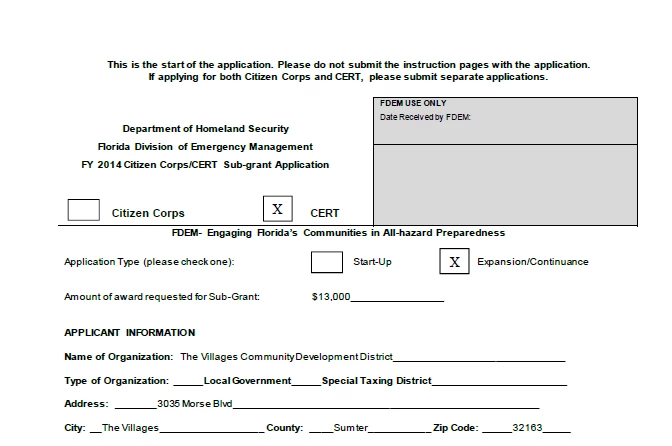
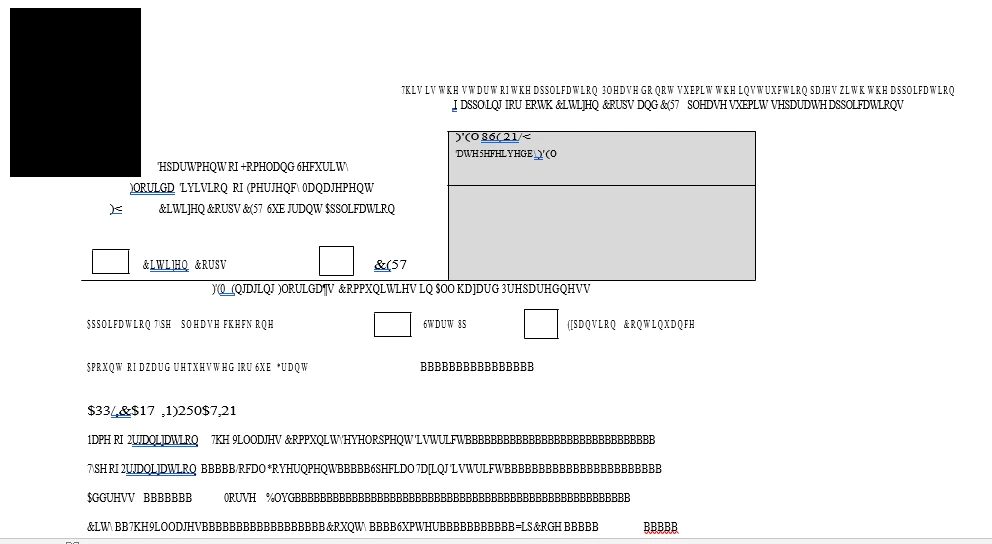
I am trying to export this:

But after the export I get this:
This topic has been closed for replies.
Correct answer Bernd Alheit

The problem is the encoding of the used fonts.

3 replies

Adorobat
Participating Frequently
June 6, 2018

Hi Gary,

Thanks for sharing the file. As mentioned above by Bernd Alheit above, its an issue with encoding of the fonts used. You may try the suggestion given in the following forums threads discussing the similar issue: Copy text from a PDF to word. Just get Symbols

When I convert my pdf to a word document, weird symbols show up on the word document. How do I prevent this? (Export PD…

Converting PDF to Word and getting gibberish

Oldskiboat
Known Participant
June 4, 2018

Is there a solution on my end or does the creator of the PDF need to handle this?     I did find a work around by using windows 10 snip tool and pasting it in a google docs area and having it translate the jpg into text.  But I would like to be able to solve this with Adobe.

Bernd Alheit
Community Expert
Community Expert
June 4, 2018

Do you own Adobe Acrobat?

Oldskiboat
Known Participant
June 4, 2018

Yes, I have Adobe Acrobat XI Pro

Regards,

Gary Huber

Adorobat
Participating Frequently
June 4, 2018

Hi Oldskiboat,

As per the issue description mentioned above, you are facing issue when trying to export pdf, is that correct?

Would it be possible if you can share the pdf file you are working with to replicate the issue at our end?

To share the file here in the forums, refer to the steps given here: How to share a file using Adobe Document Cloud

Also, let us know if you are trying to export pdf in Adobe Reader desktop application or Adobe Acrobat or online using a web browser at this link: https://cloud.acrobat.com/exportpdf

Thanks,

Shivam

Oldskiboat
Known Participant
June 4, 2018

Shared Files - Acrobat.com

The entire PDF is listed as well as page 6 that was posted already.   I also posted the page 6 word doc result that is included with this upload

Regards,

Gary

Bernd Alheit
Community Expert
Bernd AlheitCommunity ExpertCorrect answer
Community Expert
June 4, 2018

The problem is the encoding of the used fonts.