
Participating Frequently
March 16, 2020
Question

convert PDF to XML

  • March 16, 2020
  • 4 replies
  • 2354 views

Hi community,


I got 2 questions on PDF to XML conversion:

1. Sometimes Adobe could not extract images (inline images) in a table. Like the button icon below.
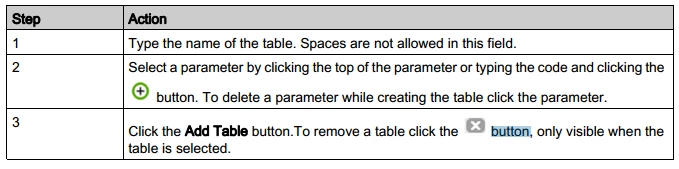
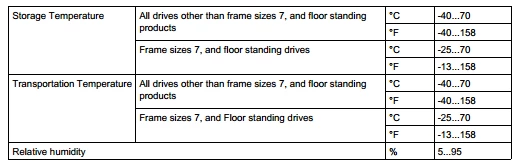
2. To extract tables from a PDF, I think Adobe is currently using the 'Stream' method by default which may not identify a cell's colspan and rowspan (a cell of a table may span multiple rows or columns or both) properly. I found that 'lattice' method could be a better solution on this.
 

Are there any solutions available in terms of the above issues?


Thanks

    This topic has been closed for replies.

    4 replies

    Bernd Alheit
    Community Expert
    Community Expert
    March 27, 2020

    This requires a plugin written in C/C++.

    Participating Frequently
    March 30, 2020

    Could you plz bring me more details about which plugin I should use and how to use it?

    Thom Parker
    Community Expert
    Community Expert
    March 17, 2020

    I'm not sure that "stream" and "lattice" methods apply to how Acrobat extracts table data. You're talking about a different tool?


    I have written table parsers for PDF. The tables you've shown above are simple ones. The lines are enough to separate out the bits. Tables can get very complicated and Acrobat doesn't come anywhere close to parsing even the simple ones.  You'll either need a special tool for this (and there are free ones out there) or spend a lot of time building a table parser yourself. Acrobat JavaScript could be used, but it is poorly suited for this type of task. For example, JavaScript could not extract the button icon in the first table, because content images are not available to the scripting model. A plug-in is what you need to do this in Acrobat. 

    Thom Parker - Software Developer at PDFScriptingUse the Acrobat JavaScript Reference early and often
    Participating Frequently
    March 27, 2020

    Yean, I've tried some other tools for table extraction like pdfplumber, tabula, camolot, pdfminer, etc. I also tried to write a table parser in python. But they all failed on generality(tables we got are in high variation, and they can be complicated).


    Basically, our goal is to get the 'rowspan' and 'colspan' attributes of each cell. For example, the first cell should have 'rowspan=4, colspan=1' such kind of attributes. Could you plz share some sepcial tools(better to be free:) for solving this problem? Or can Acrobat JavaScript or a plug-in solve this to some extent? If so, can I get more details?


    Thanks

    Thom Parker
    Community Expert
    Community Expert
    March 27, 2020

    At this time your not going to get any better than the tools you've already mentioned, especially for free. There is a company that does high end AI based PDF parsing, but not only are they extremely expensive, I don't think they are much better than the open source table parsers.  

    Thom Parker - Software Developer at PDFScriptingUse the Acrobat JavaScript Reference early and often
    try67
    Community Expert
    Community Expert
    March 17, 2020

    Re your first question: What command are you using to extract those images? Could you share a sample file with us?

    Participating Frequently
    March 27, 2020

    Thanks for your reply! For the first question, I tried to use the 'Export PDF as XML' tool. And I've contacted Adobe's customer service. They replied that they are trying to fix this issue, so let's hope for the best!

    try67
    Community Expert
    Community Expert
    March 16, 2020

    No. You will need to write your own PDF parser to do that, and in doing so you'll see how incredibly complex that process is...

    Participating Frequently
    March 17, 2020

    Great, finally I got an evidence to explain to my boss how complicated my task is. Thanks:-)

    ls_rbls
    Community Expert
    Community Expert
    March 17, 2020

    This is a great opportunity to sit down with your boss and discuss your salary raise.


    If your boss really see value in this project, ask to get the company to get you enrolled in javascripting classes at their expense.


    It all depends on how your boss can see return on investing in you, OR, outsource a developer like Try67.


    I'm pretty sure that if your boss  is a reasonable individual money should be the least of his/her worries.