Participant
January 22, 2021
解決済み

Convert txt to pdf without get the name of the file in the bottom of the document

  • January 22, 2021
  • 返信数 4.
  • 1074 ビュー

Hi, 

I am using Acrobate DC to convert txt files to pdfs. But when I have converted them, the name of the file and time of conversion is visible in the bottom of the pdf document. Is it possible to get rid of that without need to go through every document separatly?
このトピックへの返信は締め切られました。
解決に役立った回答 Bernd Alheit

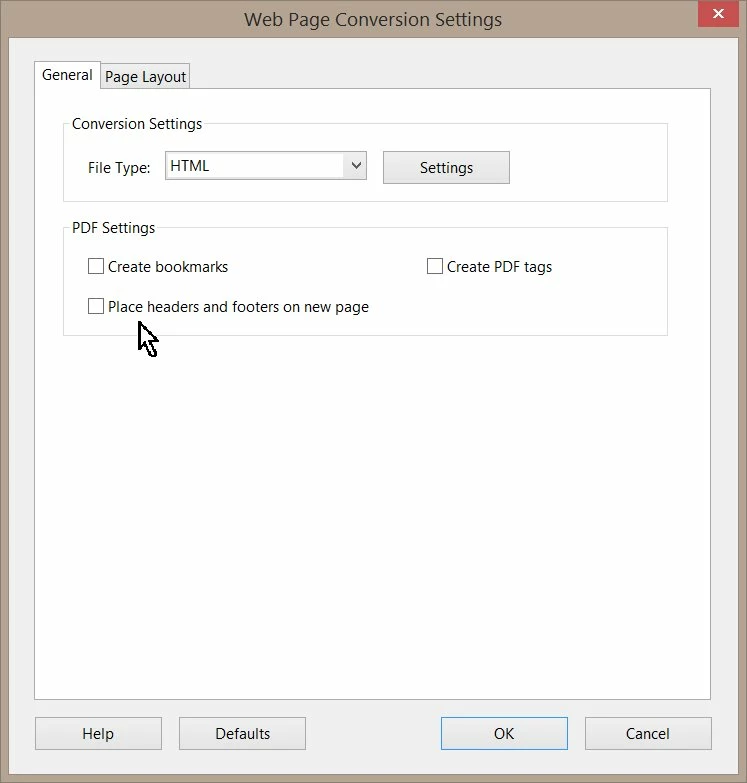
This is a setting of the Web Page conversion:

返信数 4

JR Boulay
Community Expert
Community Expert
January 25, 2021

"Does that answer your question?"

Yes, so see the answer of Bernd Alheit

Acrobate du PDF, InDesigner et Photoshopographe
Participant
January 26, 2021

Oh, now I understand. It worked! Thank you! 

Bernd Alheit
Community Expert
Bernd AlheitCommunity Expert解決!
Community Expert
January 22, 2021

This is a setting of the Web Page conversion:

JR Boulay
Community Expert
Community Expert
January 22, 2021

Do you open/convert text files with Acrobat directly or do you export to PDF from a text editor?

Acrobate du PDF, InDesigner et Photoshopographe
Participant
January 25, 2021

I'm not sure if I understood you question correctly, but I have my txt files on my computer and then I use this tool in Acrobate to convert them:

Does that answer your question?

try67
Community Expert
Community Expert
January 22, 2021

It doesn't seem like it's possible to get rid of that automatically, but you can write a script to redact that part of the file.

Participant
January 25, 2021

I see, how do I do that?