


Participating Frequently
Oct 30, 2026 4:05 PM UTC
Question

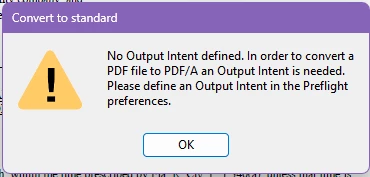
Converting a pdf to pdf/a

How to create a document to pdf/a? This used to be a simple step of just selecting the pdf/a option from the dropdown menu. Now it requires deciphering this message and what’s required. I go into the options and it all seems like gibberish.  I’m so tired of all these so-called-updates that makes things more complicated 
 

    10 replies

    Participating Frequently
    Oct 30, 2026 9:17 PM UTC


    Translate
    Community Manager
    Oct 30, 2026 9:20 PM UTC

    Hi ​@Ruth35283386lq1d,

    Thank you for sharing the screenshot and the Acrobat version details.

    From what I can see, you've successfully created a new Output Intent and Acrobat has already assigned an ICC profile (Adobe RGB (1998)). That appears to be the step that was missing earlier.

    At this point, you shouldn't need to manually complete every field shown in the Output Intents dialog. Please try clicking OK (or Save) to save the Output Intent, close the Preferences window, and then attempt the Save as PDF/A conversion again.

    If Acrobat displays another message or the conversion still doesn't complete, please share a screenshot of the next screen or error message and we'll be happy to help with the next step.

    Please let us know how it goes.

    Thanks,
    ^AV

    Translate
    Participating Frequently
    Oct 30, 2026 9:14 PM UTC

    This is as far as I got. I dont understand what I’m to choose or create. Thanks.

    Translate
    Participating Frequently
    Oct 30, 2026 5:42 PM UTC

    This is where I’m suck. 

    Translate
    Community Manager
    Oct 30, 2026 5:55 PM UTC

    Hi ​@Ruth35283386lq1d,

    Thanks for sharing the screenshot.

    I can see where the confusion is coming from. You've already reached the Output Intents settings that were mentioned earlier, but the window is presenting a number of technical fields without much guidance on what information is actually required to continue the PDF/A conversion.

    Just to make sure we're on the same page, were you able to review the HelpX article Amal shared?

    https://helpx.adobe.com/acrobat/using/output-intents-pdfs-acrobat-pro.html

    From the screenshot, it appears that no Output Intents are currently configured, which is why the list on the left is empty and the fields on the right are unavailable.

    Could you click the "+" button in the lower-left corner and share a screenshot of the next screen that appears? That will help us see the options Acrobat is presenting and identify exactly where you're getting stuck in the process.

    Also, could you confirm which version of Acrobat you're using (Help > About Acrobat)?

    Once we have those details, we'll be in a much better position to guide you through the remaining steps.

    Thanks,
    ^AV

    Translate
    Participating Frequently
    Oct 30, 2026 5:38 PM UTC

    This is where I’m stuck/confused. :

    -(

    Translate
    Participating Frequently
    Oct 30, 2026 5:34 PM UTC

    I don’t understand what I need to do as this wasn’t an issue in past versions of adobe. 

    Translate
    Participating Frequently
    Oct 30, 2026 5:31 PM UTC

    This is where it’s gibbeish to me. I have no idea what I’m to put here

    Translate
    Known Participant
    Oct 30, 2026 5:18 PM UTC

    The error message suggests that Acrobat needs an Output Intent profile before converting a PDF to PDF/A. Have you checked the Preflight preferences to see if an Output Intent is already configured? You may need to select or create the appropriate ICC color profile before running the conversion again. Hopefully this helps simplify the process.

    Translate
    Amal Jaiswal
    Community Manager
    Community Manager
    Oct 30, 2026 5:26 PM UTC

    Hi ​@Ruth35283386lq1d 

    I hope you are doing well, and thanks for reaching out and sharing the screenshot. I’m sorry the message is confusing. It means Acrobat needs an Output Intent defined in the Preflight preferences before it can convert your PDF to PDF/A. This is a one-time setup, and here are the steps:

    1. Choose See all tools > Use print production > Preflight.

    2. Go to Options and select Preferences.

    3. Open the Output Intents tab. To create one from scratch, select the Create A New Output Intent icon. To base it on an existing one, select it in the left pane and then select the Duplicate Selected Output Intent icon.

    4. Set the output intent options and select OK.

    After that, choose All tools > Apply PDF standards > Save As PDF/A, pick a location, and select Save to convert your file again.

    For more information please check the help page Output intents in PDFs (Acrobat Pro)

    Let us know how it goes.

    Regards
    Amal


    Translate