
Participant
April 16, 2020
Question

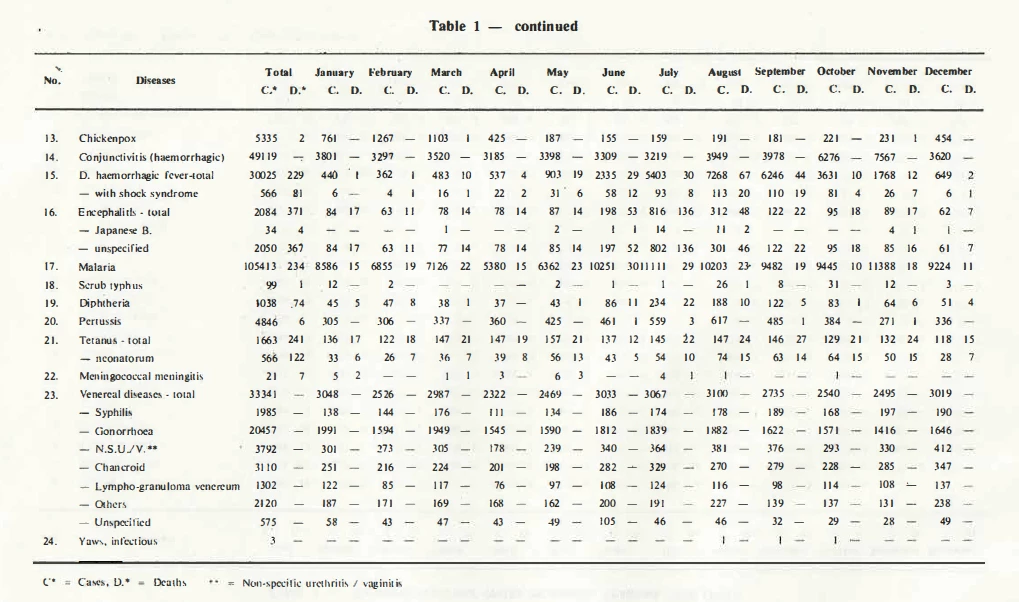
Converting a table in PDF to Excel Spreadsheet

  • April 16, 2020
  • 2 replies
  • 653 views

I'm trying to export the following table in a PDF into an Excel spreadsheet using Adobe Acrobat Pro DC.  When I try to export, however, all of the values end up in a single cell rather than separting by rows and columns.  I think this is because the PDF table does not have any lines dividing the columns and rows.  Is there anyway to add rows and columns over the PDF or otherwise troubleshoot this issue?
This topic has been closed for replies.

2 replies

Bernd Alheit
Community Expert
Community Expert
April 20, 2020

Try tagging the PDF file.

ls_rbls
Community Expert
Community Expert
April 20, 2020

Are you trying to do a like a copy and paste of the table into an opened PDF form?


Are you importing an Excel workbook  using Acrobat, OR, are you exporting a workbook  from Excel to Acrobat?


And which method are you using ? Are you doing this direclty from the MS Excel as a Save As PDF? Are you using the Adobe PDF Maker add-in in MS Office, or are you performing everything from Acrobat?