
November 9, 2019
Question

Converting to PDF/A 1-a: Structure tree root entry missing and MarkInfo missing

  • November 9, 2019
  • 2 replies
  • 4511 views

Hello everybody,

I am trying to obtain a PDF/A 1-a file from Latex but I am having some big issues. In part it is also because I am quite ignorant about this different versions since it is the first time I had to generate such file.


I have many issues but the problem is that, even when trying to convert the most simple example, I get that the structure tree root is missing and MarkInfo is missing too. 
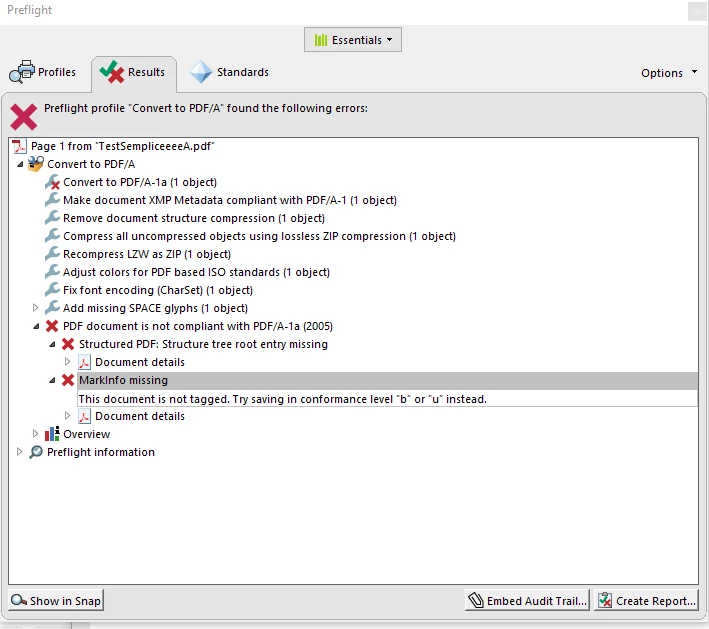


Do you have any idea where the problem might be?

Thank you!

This topic has been closed for replies.

2 replies

Legend
November 10, 2019

"Can you give me any guidance regarding fonts which are not embedded and how to deal with transparencies?"


The simplistic reply: don't use either of these. This is the specific INTENTION of PDF/A-1 (both versions), to forbid these things.


To give more detail

1. Always embed fonts. There is now no reason not to, and while some very simple tools won't do this, any serious LaTeX tools should do it. SOME fonts can't be embedded at all (for license reasons) and in this case you have to use a different font.

2. If you must use PDF/A-1 you must avoid transparency. Nonrectangular PNG images are likely to use transparency. JPEG should not, unless you add masks or cutouts or translucency. The Acrobat preflight can flatten transparency in most cases, though this can harm quality depending on your options. Or use PDF/A-2, since allowing transparency was the big change there, if permitted.

November 10, 2019

1. Yes, exactly. I understood which character was giving issues and I just replaced it with something simple.

2. I only have rectangular pictures but the problem seems to persist with both PNG and JPEG. I will do some trial and error to see if I can grasp additional info regarding the error.

Legend
November 9, 2019

Does you LaTeX software claim to be able to make tagged PDF?  This is often a manual process taking weeks. 

November 9, 2019

Thank you for your answer. 

Unfortunately I don't know. I use TexStudio to write my Latex code but I am not familiar with these concepts. It is the first time that I have to put together a PDF/A (1-a) file. 


I thought it could have been a problem with the metadata stuff.

Legend
November 10, 2019

Creating PDF/A-1a files is a huge undertaking and can require new skills and lots of time. This is because, while PDF/A-1b can be largely automated, PDF/A-1a needs accesssibility. This means every word and every graphic in the PDF has to be correctly marked saying what its relationship is to every other word and graphic.


My advice, if you don't want to learn this stuff, is to find a document creation tool that does it for you, like Word (with Acrobat, in Windows) or InDesign. It may seem a lot of work to use Word instead of LaTeX but you haven't seen the work you have to do otherwise.  I do recommend, however, that you ask in the TeX community. You might be pleasantly surprised and find that there is a LaTeX workflow that already creates accessibility from a suitably structured original.


Be aware that if your design is visual rather than structured, you will need a lot of work to make correctly tagged files.