
Participant
April 29, 2020
Question

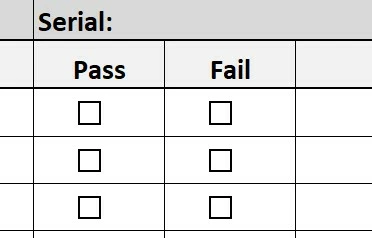
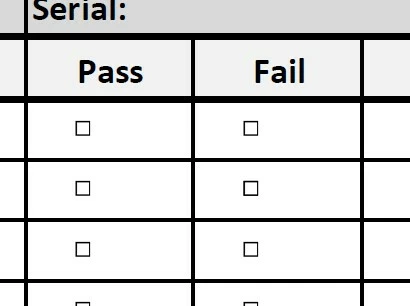
Converting to PDF from Excel, the check boxes display smaller

  • April 29, 2020
  • 1 reply
  • 3450 views

I have a file that used to convert from Excel to PDF with no issues. Now when it is converted, the checkboxes display smaller on pdf than they did on excel. Using Acrobat Pro DC. Any ideas?
This topic has been closed for replies.

1 reply

ls_rbls
Community Expert
Community Expert
April 30, 2020

Hi, yes I may have an idea but you need to specify a few things so I don't give an incorrect anwer.


Before the conversion to PDF,  did you run the MS Excel Accessibility Checker?


See here: https://support.office.com/en-us/article/improve-accessibility-with-the-accessibility-checker-a16f6de0-2f39-4a2b-8bd8-5ad801426c7f&ved=2ahUKEwiOgcK2u4_pAhUFQawKHYrxAoEQFjADegQIAhAB&usg=AOvVaw36GLAorbNsTdy64oYyU0aO 


And which conversion to PDF method  are you using?


  • Are you using Save As method?
  • Are you exporting directly from MS Excel to PDF file format?
  • Are you using the Adobe Acrobat PDF Maker add-in?
  • Are you just doing a normal save in Excel, then opening the file directly in Acrobat and letting it handle the conversion and optimization automatically?
  • OR, do you just open Acrobat and use the "Import to" feature?


Participant
June 2, 2020

Hi, i have the same problem, i ran Accesibility Checker and i asigned a description by checkbox. I had been using only two methods to export: Save As, Print Selection. I had the same results, the checkbox is smaller in Acrobat than Excel View. Any idea?

try67
Community Expert
Community Expert
June 2, 2020

The Save As PDF method is Microsoft technology. Use the Adobe PDFMaker plugin (via the Acrobat ribbon) instead.