

Participant
November 3, 2025
Question

Copy Count Defaults to 2 Copies

  • November 3, 2025
  • 3 replies
  • 647 views

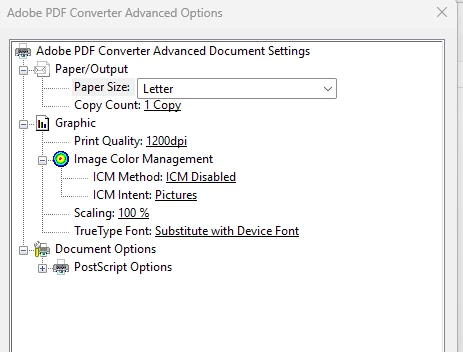
I went into the Adobe PDF preferences and Copy Count is set to 1 Copy but everytime I print to a PDF, the dialog defaults to two copies. Anywhere else I should look to change the default to 1 Copy?

 

3 replies

Participant
February 12, 2026

I am having the same issue, did you find a solution?

Randy Hagan
Community Expert
Community Expert
November 3, 2025

Sometimes a trigger in an application's Print screen, independent of what you've set up for your printer options, will result in you getting different results than you've set up for your printer options. In rare occasions, it may not even be the application you're printing from.


If you have any other Adobe apps I'd start there first, and realize that in those apps you not only have application defaults, you have saved document results as well. So you may have to address the issue more than once to completely eliminate the issue. Then I'd go through the programs that you use regularly. I'd pay special attention to programs that run all the time in the background, like Outlook and other email applications. Since it's consistently two, instead of one, it's likely a setting somewhere in your system. If you can find that, and change the default back, I'm confident that it will likely be the end of your problems.


Hope this helps,


Randy

Meenakshi Negi
Community Manager
Community Manager
November 3, 2025

Hi michaell17489047,


Thank you for reaching out.


Please also check the Printer settings. There is a possibility that the default is set as 2 copies for the printer. 

Also, check the "copies" selected in the Print window in Acrobat.

For more information on printing, please refer to the following help document: https://adobe.ly/43xClxJ.


Let us know how it goes.


Thanks,

Meenakshi