
Copy Text Ctrl+C does not work
Dear Adobe Community,
I use the latest version of Microsoft Edge.
For work I open a lot of PDF's, and I usually open them in the Edge browser because it is faster and I can easily switch between my normal browser and my PDF.
However, I noticed an issue when trying to copy text out of a PDF. Obviously, the fastest way is to select text and press Ctrl+C. However, Adobe seems to have made it that whenever you select text it gives you direct options in a pop-up. This would be fine by me, but the problem is that it blocks my Ctrl+C command and I end up not copying anything.
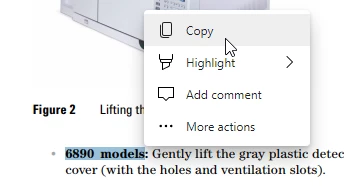
I do understand that I can use the copy option in the pop-up window, but I really don't want to. Generally, selecting text and pressing Ctrl+C is much faster!
Does anyone know a workaround for this? I don't want to get this pop-up anymore that blocks my Ctrl+C command.
Kind regards,
S.


 AdChoices