
Participant
February 10, 2021
Question

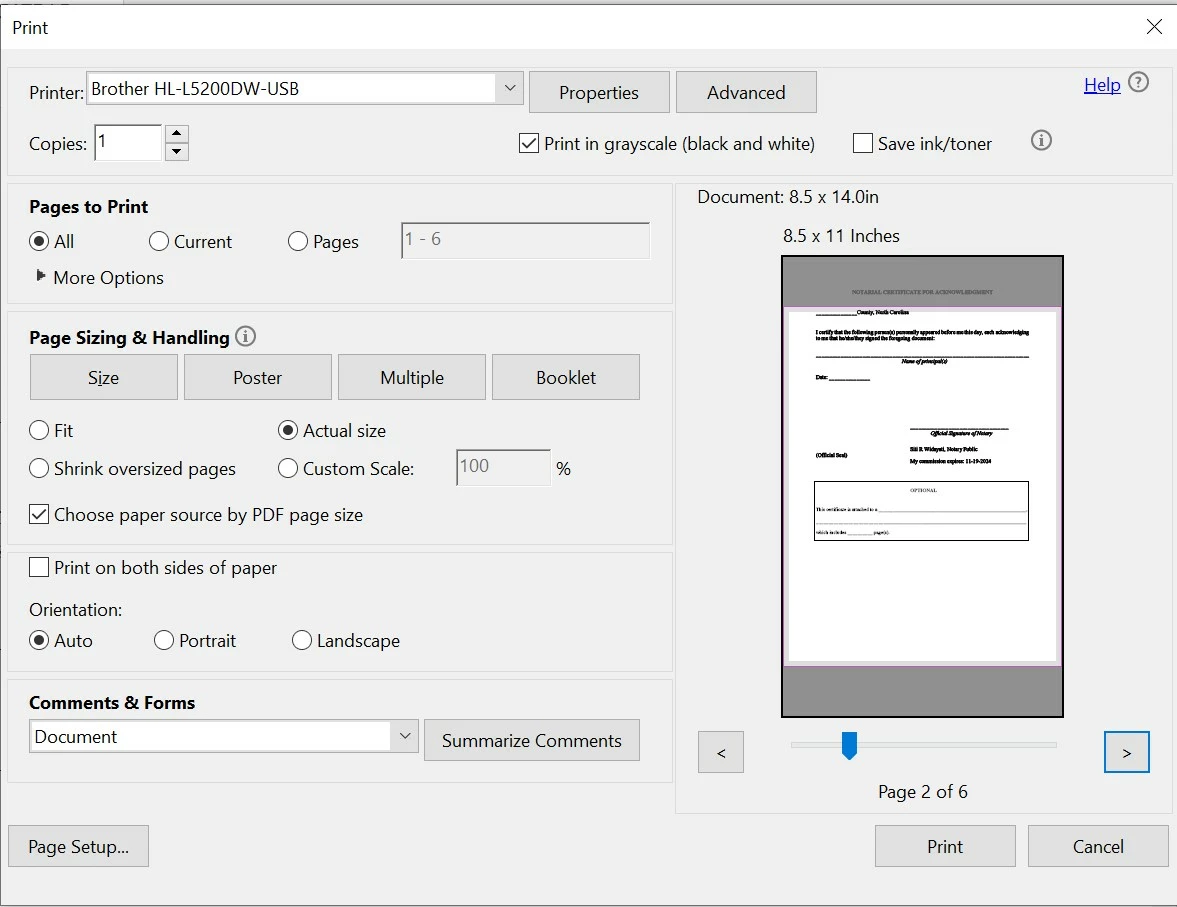
Could not print on correct size paper after latest update AARDC 21.001.20135

  • February 10, 2021
  • 2 replies
  • 835 views

I got Brother dual-tray printer and usually print my docs through Adobe Acrobat Reader DC with no problem but after the latest update, it won't print right. All my legal size docs printed in letter size paper even though the printer settings is correct (I checked the "choose paper source by pdf size"), see attached. Anyone experiencing the same problem? Anyone know how to resolve this issue?


This topic has been closed for replies.

2 replies

Meenakshi_Negi
Legend
February 15, 2021

Hi All,


Thank you for your patience and sorry for the inconvenience casued.


We have released an update for Acrobat and Reader DC(version 21.001.20138) that contains the fix. 

Please update the application to the latest version. In the application, go to Help > Check for updates.


For more information about the latest version, please refer to this link: https://www.adobe.com/devnet-docs/acrobatetk/tools/ReleaseNotesDC/continuous/dccontinuousfeb2021qfe.html#dccontinuousfebtwentytwentyoneqfe 


Let us know how it goes.


Thanks,

Meenakshi

AkanchhaS8194121
Legend
February 11, 2021

Hi,


Thanks for reporting this to us. Would you mind trying the troubleshooting steps suggested in the similar discussion here: https://community.adobe.com/t5/acrobat/pdf-print-paper-size/td-p/11821135 


Let us know if that helps.


Thanks,

Akanchha 

Siti5CD4Author
Participant
February 11, 2021

It resoves the issue! I really appreciate the prompt reply! Thank you so much!