


November 27, 2025
Question

Coverting PDF to Word doesn't keep table format

  • November 27, 2025
  • 1 reply
  • 571 views

Hello All,

Until two weeks ago, I was able to convert PDF to Word and tables were converted as such and no background colours and other formatting were included. Now, the converted Word file is visually identical to the original PDF, no tables but tabs separating columns.

These are my current version and settings:

Adobe Acrobat Version 2025.001.20937 | 64-bit, License: Acrobat Standard
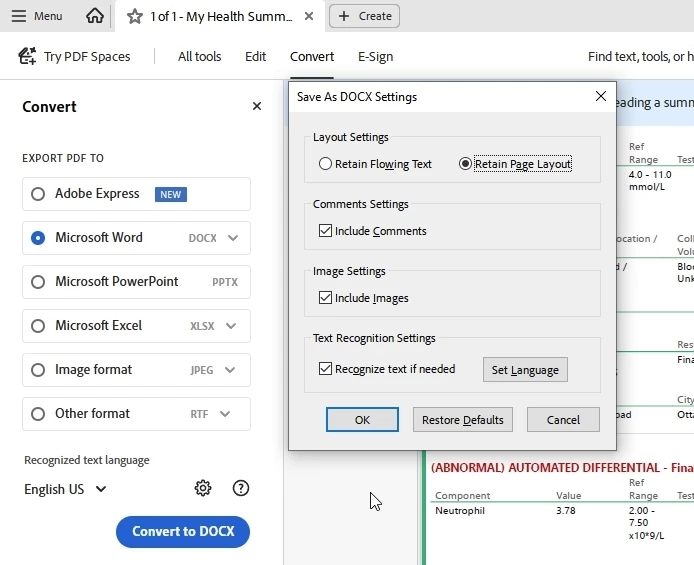
 

I would appreciate your help. Thank you!


1 reply

Meenakshi_Negi
Legend
November 27, 2025

Hi Hector1949,


Thank you for reaching out.


As mentioned, the PDFs used to convert fine before, could you please share a sample file that was converted fine and how it converts the file now? 

Please share the Acrobat and OS version numbers currently in use.


Thanks,

Meenakshi

November 27, 2025

Hi Meenakshi Negi,

Thank you for your reply. Version and OS:

Adobe Acrobat Version 2025.001.20937 | 64-bit, License: Acrobat Standard | Windows 10, Version 10.0.19045 Build 19045


Sorry, I cannot share the documents as they are confidential.

If you haven't seen this issue before, let me rephrase the issue as a question:

If I have a PDF with formatting, colour background, etc., how do I convert it to Word only exporting text and keeping table format?  What it is happening is that the conversion doesn't interpret the layout in the PDF as a table as it did before. Here is a screenshot of part of the PDF document:

Thank you!

November 27, 2025

And here is the Word screenshot of the exported PDF: