
Known Participant
May 18, 2020
Question

Crash in Invoices PDF new update

  • May 18, 2020
  • 3 replies
  • 3850 views

Hello,

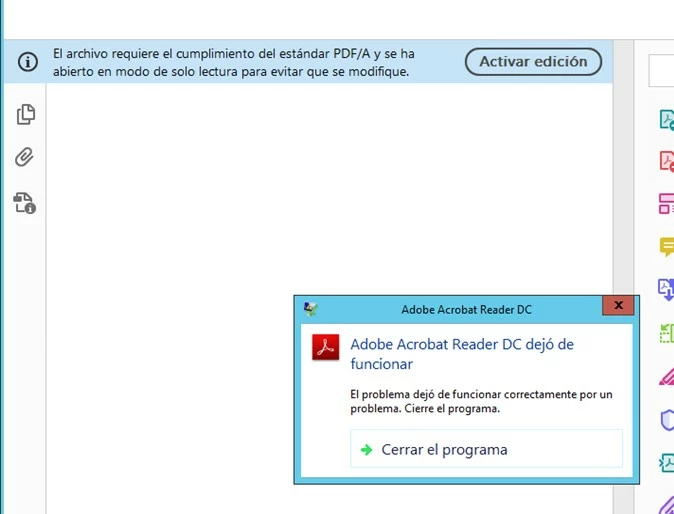
In the last update 13-14 May, we have a problem with some PDFs that are invoice, which previously we had not left the problem. This PDF says: The file requires compliance with the PDF / A standard and has been opened in read-only mode to avoid modification. In PC Windoews 10, it can be activated but after the sale of the VDI infrastructure with Windows Server, the program closes automatically when the PDF is opened giving these errors:


Nombre de la aplicación con errores: AcroRd32.exe, versión: 20.9.20063.54258, marca de tiempo: 0x5eaf4c6f

Nombre del módulo con errores: JP2KLib.dll, versión: 1.2.2.46033, marca de tiempo: 0x5e8b9e22

Código de excepción: 0xc000001d

Desplazamiento de errores: 0x0006cd19

Identificador del proceso con errores: 0x5134

Hora de inicio de la aplicación con errores: 0x01d62cf5e5a88373

Ruta de acceso de la aplicación con errores: C:\Program Files (x86)\Adobe\Acrobat Reader DC\Reader\AcroRd32.exe

Ruta de acceso del módulo con errores: C:\Program Files (x86)\Adobe\Acrobat Reader DC\Reader\JP2KLib.dll

Identificador del informe: 2419f947-98e9-11ea-8352-0050569e9ca5

Nombre completo del paquete con errores:

Identificador de aplicación relativa del paquete con errores:


Windows no puede tener acceso al archivo  por alguna de las siguientes razones: Hay un problema con la conexión de red, con el disco donde se almacena este archivo o con los controladores de almacenamiento instalados en este equipo; o bien no se encuentra el disco. Windows cerró el programa Adobe Acrobat Reader DC por este error.


Programa: Adobe Acrobat Reader DC


Thanks
This topic has been closed for replies.

3 replies

Participant
July 23, 2020

We have the same problem with crashing adobe reader DC 20.009.20074 of JP2KLib.dll and forcing Adobe Reader to close when opening certain PDFs since version 20.009.20042.
We have upgraded to the latest version, but this problem still occurs in our VDI environment.

Participant
July 23, 2020

Same problem here.

Windows 2012 R2 Terminal Server, Adobe Reader DC 20.009.20074 --> Adobe Reader is crashing.

Before updating to the latest Version we had 2019.021.20058, there every PDF opens fine.

I replaced JP2KLib.dll in 20.009.20074 with JP2KLib.dll from 2019.021.20058 --> again every PDF opens fine.

Adobe Employee
September 25, 2020

Hi,

Sorry for the inconvenience.

Please let me know if you are still facing this issue.


Thanks,

Sweta Karn


Amal.
Legend
June 2, 2020

Hi there


++ Adding to the discussion


A new version of Adobe Acrobat/Reader DCis now available version 20.009.20065. Please update the application to the new version go to Help > Check for Updates and see if that makes any difference.


Let us know ho wit goes


Regards

Amal

Participant
June 3, 2020

As per my original response, we have already tried 0065 and as of today, 0067 which broke everything again...

There is no mention of this issue in the "known issues" which suggests the issue has not been logged with the developers: https://helpx.adobe.com/acrobat/kb/known-issues-acrobat-dc-reader.html.

There is also no mention of it in the bug fixes for the 0067 release: https://www.adobe.com/devnet-docs/acrobatetk/tools/ReleaseNotesDC/continuous/dccontinuousmay2020qfe2.html#dccontinuousmaytwentytwentyqfe2.

Unless this is escalated to the right channels, I do not see a fix for this in any future updates.


Adobe Employee
May 19, 2020

Hi sergiol86


We apologize for the experience you had with latest update of Adobe Reader.

We will try to investigate this at our end. Please share a sample test PDF/A file with us.

You can use dropbox/drive and share downloadable link.


We would also, like to know if you face similar issue on a non VDI infrastructure Windows Server environment?


-Digvijay

sergiol86Author
Known Participant
May 19, 2020

Hello Digvijay,


When you said: "We would also, like to know if you face similar issue on a non VDI infrastructure Windows Server environment?" 

Is when crash Adobe in VDI, en normal environment with personal computer in local doesn´t crash but the warning is the same.

Can I send you a PDF a your email? Why are invoices...dibisht@adobe.com?

for exemple


Thanks!

Adobe Employee
May 19, 2020
Thank you for confirming on the details -
  1. The crash is only on VDI environment
  2. On a non-VDI i.e Local environment you see "warning" but no crash
These will help us in our investigation too