
Inspiring
September 23, 2019
Question

Create PDF from clipboard - always use A4 papersize

  • September 23, 2019
  • 1 reply
  • 520 views

When creating a PDF from clipboard (a screenshot), I would like to have it converted to A4 papersize.

It happens that the paper size is way too large and so the printer reports an error.

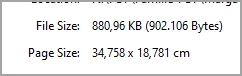
Below are the properties of a screenshot used to create a PDF.

Is there a way to have data pasted from clipboard always set to A4 paper size?

i.e. in the below example it would then read 21,0x29,7cm

Thanks.


    This topic has been closed for replies.

    1 reply

    Legend
    September 23, 2019

    Probably best to paste into Word instead to prepare the pages and make the PDF.

    adwul62Author
    Inspiring
    September 24, 2019
    Thank you. I see, when it comes to formatting, etc. Acrobat requires a document created by another application as 'source', so it will then adopt the settings/formatting from that application.