


Participant
January 30, 2026
Question

Creating a form that sets multiple fields to required if Date field is populated
  • January 30, 2026
  • 1 reply
  • 40 views

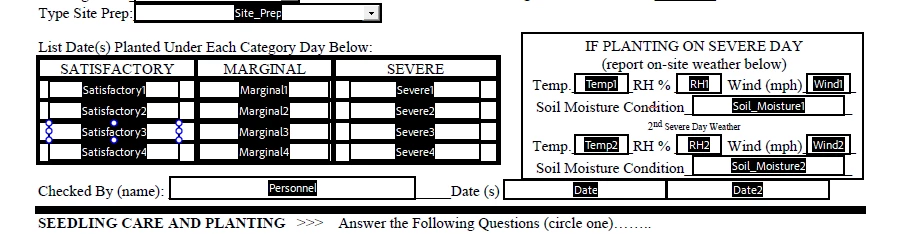
I have an existing (tree planting) form that I am making fillable. The Satisfactory, Marginal, and Severe fields are all ‘date’ fields. If a date is placed in the “Severe” column, I need it to require the completion of the Temp, RH, Wind and Soil_Moisture1/2 in the “If Planting On A Severe Day” column.

Most of the time, only one day may be severe, so whichever cell is “Severe(1-4)” It needs to go in the Temp1, RH1, Wind1, and Soil_Moisture1 first followed by the second set of readings. 


Thanks in advance

Doug

    1 reply

    JR Boulay
    Community Expert
    Community Expert
    January 30, 2026

    Use this as a calculation script in any field of the form:


    if (this.getField("Severe1").value == "" && this.getField("Severe2").value == "" && this.getField("Severe3").value == "" && this.getField("Severe4").value == "") {
    this.getField("Temp1").required = false;
    this.getField("RH1").required = false;
    this.getField("Wind1").required = false;
    this.getField("Sol_Moisture1").required = false;
    }
    else {
    this.getField("Temp1").required = true;
    this.getField("RH1").required = true;
    this.getField("Wind1").required = true;
    this.getField("Sol_Moisture1").required = true;
    }


    Acrobate du PDF, InDesigner et Photoshopographe