Participating Frequently
July 3, 2024
Answered

Creating a Template

  • July 3, 2024
  • 3 replies
  • 2725 views

Hi Folks,

I'll try to get to the point (the urge to vent on this one is strong).


Anyway...I'm using Acrobat Pro DC 2015 desktop (perpetual license).  This was sold to me by Adobe as an "upgrade" to version 9.1, but it's lacking a lot of features (sorry, I told you the urge was strong).  I'm having a lot of difficulty figuring out how to save a page as a template.  

What I'm trying to do is give a form the ability to spawn a page (that part isn't a problem).  I need the page to be saved as a template, but after exhaustive online searches it appears that my "upgraded" version may not accommodate that.

Does anybody have any suggestions, instructions, direction, etc. on how I might accomplish this?

Thanks much!
This topic has been closed for replies.
Correct answer Thom Parker

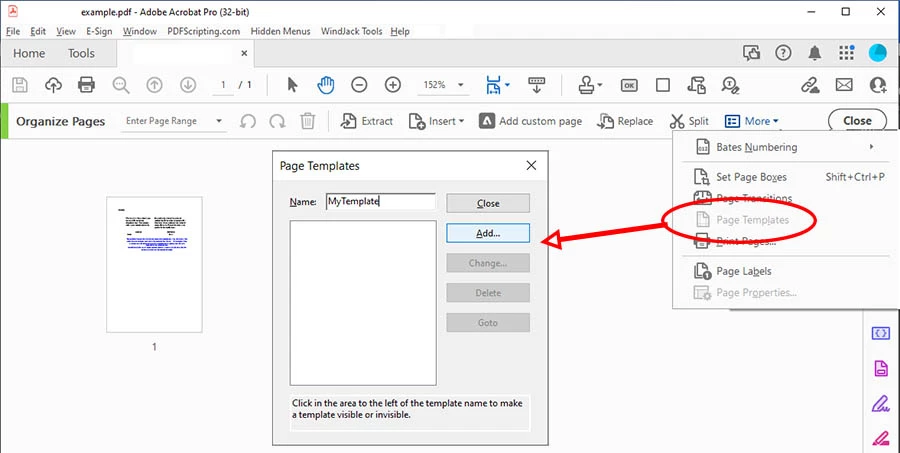
The page template tools haven't changed since Acrobat 5.  However, the entrance into the Page Template tool has changed dramatically. In Acrobat DC the page template tool is accessed from the "More..." menu in the "Organize Pages" toolset (as shown below).   In previous versions the Page Template tool was accessed through the toolset associated with either the Pages or PDF editing.  In Acrobat 10 it's under the "Document Processing" toolset. 

Here's what it looks like when you get it.


3 replies

PDF Automation Station
Community Expert
Community Expert
July 3, 2024

Search "Template" in the Tools tab.  You can also add this tool to the toolbar by right-clicking the toolbar, select Customize Quick Tools, selecting and adding the tool "Page Templates" under the Organize Pages category.


https://www.youtube.com/watch?v=ynoGsgVse8U

Thom Parker
Community Expert
Thom ParkerCommunity ExpertCorrect answer
Community Expert
July 3, 2024

The page template tools haven't changed since Acrobat 5.  However, the entrance into the Page Template tool has changed dramatically. In Acrobat DC the page template tool is accessed from the "More..." menu in the "Organize Pages" toolset (as shown below).   In previous versions the Page Template tool was accessed through the toolset associated with either the Pages or PDF editing.  In Acrobat 10 it's under the "Document Processing" toolset. 

Here's what it looks like when you get it.


Thom Parker - Software Developer at PDFScriptingUse the Acrobat JavaScript Reference early and often
Bernd Alheit
Community Expert
Community Expert
July 3, 2024

How do you spawn the page?