
Participant
June 25, 2024
Question

Creating fillable minute field

  • June 25, 2024
  • 2 replies
  • 564 views

So, I have the hour field done real easy. You just have to have it in number format, and validate between 1-12. Easy peasy. The minute field.... is being a little more difficult. The document already has the ":" in between the 2 text fields. 


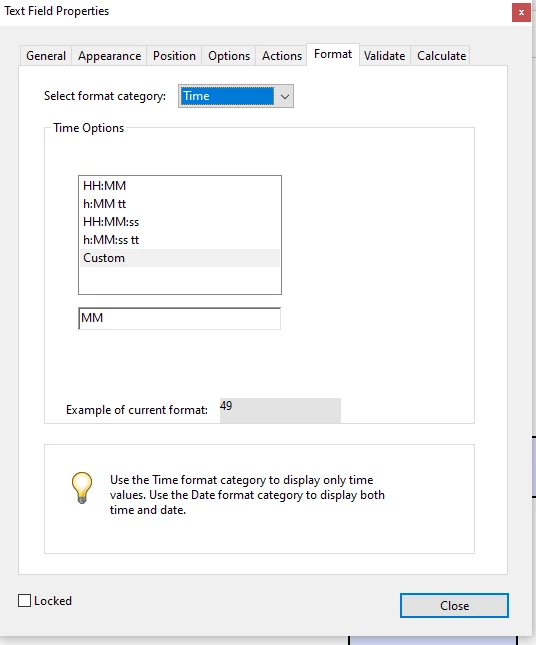
I tried entering a custom time field using "MM", but it comes up with errors every time. My problem is that anything that is "00" won't display properly in number format (you type "00" and it shows up as "0". I have it set up as Time>MM. It comes up saying "The value entered dooes not match the format of field X". 


I could create a dropdown list for both, but I really do NOT want to enter 60 numbers manually. 
 

This topic has been closed for replies.

2 replies

try67
Community Expert
Community Expert
June 25, 2024

Use the Number format and set the built-in Validation to only accept values between 0 and 59. Done.

And populating a drop-down is easy with a script, although I think it will be annoying for the user to have to select the exact time. You can do it in intervals of 5/10/15 minutes, instead.

This code will populate the drop-down will all the options, just change i++ in the for-loop to i+=10 to do it in 10 minute intervals, for example:


var items = [""];
for (var i=0; i<60; i++)
	items.push((i<10) ? "0"+i : i);
this.getField("Minutes").setItems(items);


Nesa Nurani
Community Expert
Community Expert
June 25, 2024

1. Under 'Options' tab, select 'Limit of' and set to 2 characters.

2. Under 'Format' tab, select 'Custom' and as 'Custom keystroke script' use this:

    event.rc = /^\d*$/.test(event.change);

(this will allow only numbers to be entered into the field)

3. Under 'Validate' tab, use this script:

if (event.value !== "") {
var num = event.value;
if (num < 0 || num > 59) {
app.alert("Please enter a value between 0 and 59.");
event.rc = false;}
else
event.value = util.printf("%02d", num);}