
Participant
October 11, 2024
Answered

Creating uniformed and aligned checkboxes within a table

  • October 11, 2024
  • 1 reply
  • 1267 views

Hello!


I have a form with a table and the table needs to have checkboxes (one in each cell). I have aligned them vertically centered but I want them each to appear in the space location, 'floating' in the cell. I need to do this for four different columns and eleven rows each so doing this manually is making me pull my hair out. Any easy steps is much appreciated.
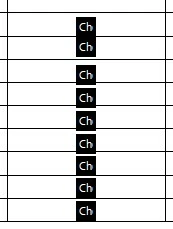
Thanks!

Skye

This topic has been closed for replies.
Correct answer PDF Automation Station
  • Align the first column vertically be selecting all check boxes in that column by dragging the mouse around all of them, right-clicking on one of them (the one with the best left-alignment), then selecting  Align Left form the alignment menu.
  • Move each check box up or down by selecting it and pressing the up or down arrows on your keyboard until it's in the correct position in the cell.
  • Now drag the mouse over all the check boxes in the first row, click the first cell and select Align Horizontally.  Do this for each row.
  • Align the remaining columns vertically by using the method in the first bullet point.

1 reply

PDF Automation Station
Community Expert
Community Expert
October 11, 2024
  • Align the first column vertically be selecting all check boxes in that column by dragging the mouse around all of them, right-clicking on one of them (the one with the best left-alignment), then selecting  Align Left form the alignment menu.
  • Move each check box up or down by selecting it and pressing the up or down arrows on your keyboard until it's in the correct position in the cell.
  • Now drag the mouse over all the check boxes in the first row, click the first cell and select Align Horizontally.  Do this for each row.
  • Align the remaining columns vertically by using the method in the first bullet point.
skye_5399Author
Participant
October 11, 2024

Thank you! A combo of your steps and another community response and I got it to work. Much appreciated!