


lindsaym11404628
Participant
Dec 11, 2017 9:23 PM UTC
Answered

Crop marks won't show up over image?

I'm attempting to add crop marks to an entire PDF document, but I keep getting a dialogue box that says:

"Printer marks may overlap artwork. You may need to expand the Crop box using the Crop dialogue."

This doesn't mean much to me... can anyone help? I don't really understand why pages with bleed graphics aren't getting the crop marks.

Thanks!!
Cari JansenCorrect answer
Legend
Dec 15, 2017 1:12 PM UTC

What that message means is that although the crop marks have been added when you  use "Add Printer Marks", they are not visible until you increase the page size of the document.

  1. Start by Opening Print Production tools
  2. Apply the trim marks, by clicking on Add Printer Marks, follow the default prompts as you've done previous, and click through that warning message.
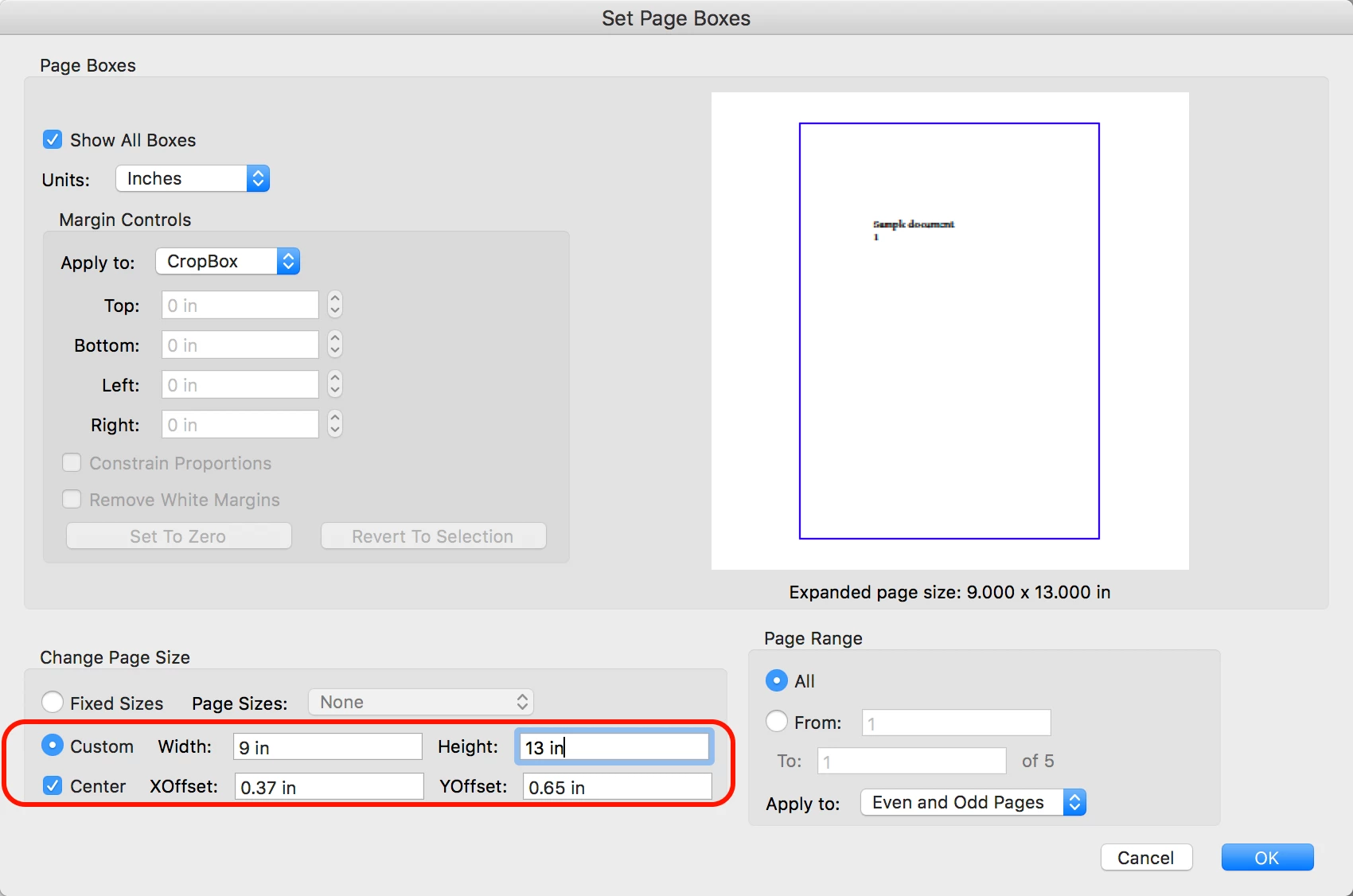
  3. While still in Print Production tools, click on Set Page Boxes
  4. Below the preview of the PDF you'll see the current page size.
  5. Calculate what the new cropbox settings need to be and adjust the Page Size
  6. Set Page Range to All and click OK.

You should be able to see the crop marks you've added initially after doing this.

6 replies

Cari JansenCorrect answer
Legend
Dec 15, 2017 1:12 PM UTC

What that message means is that although the crop marks have been added when you  use "Add Printer Marks", they are not visible until you increase the page size of the document.

  1. Start by Opening Print Production tools
  2. Apply the trim marks, by clicking on Add Printer Marks, follow the default prompts as you've done previous, and click through that warning message.
  3. While still in Print Production tools, click on Set Page Boxes
  4. Below the preview of the PDF you'll see the current page size.
  5. Calculate what the new cropbox settings need to be and adjust the Page Size
  6. Set Page Range to All and click OK.

You should be able to see the crop marks you've added initially after doing this.

Translate
Participant
Dec 13, 2023 5:16 PM UTC

Very helpful! Thank you!


Translate