


Participating Frequently
October 10, 2024
Answered

CTRL+C not working/ Right-click Copy works fine

This topic pops up periodically in the Acrobat community, but none of the prior resolutions fit my situation. I confirmed with my coworkers that this issue is not unique to my computer as multiple people have this same issue.  With Adobe Acrobat Pro open, right-click Copy works fine; however, when I'm copying data between forms and applications all day, and Acrobat is the only one that CTRL-C doesn't work, it has resulted in the wrong data being pasted or none at all. It is now getting to the point of impacting workflow for our team.

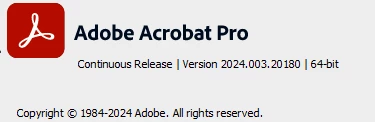
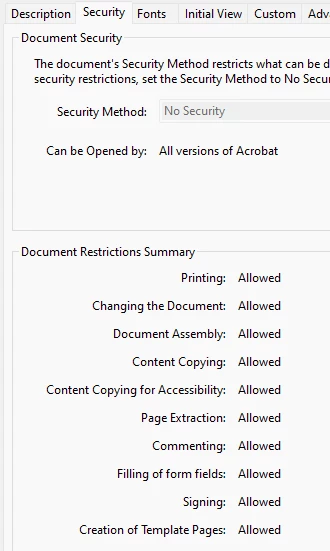
I did NOT have this issue when using Adobe Acrobat Reader; however, this became an issue when our company updated its license to Adobe Acrobat Pro - Continuous Release, and we are currently using V. 2024.003.20.180. There are NO restrictions set on the forms.


Thank you in advance for any assistance.


Dan32024026wvsvCorrect answer
Participant
February 3, 2025

I was able to resolve the issue with this solution.

Press and hold the Ctrl key.

Press the C key.

Release the Ctrl key.

Release the C key.

After I did this I was able to release the Ctrl and the C in any order and it worked, but I first had to do a copy paste using the above order a single time. 

I found this solution here:

https://helpx.adobe.com/digital-editions/kb/copying-ctrl-c-sometimes-fails.html

26 replies

Participant
October 7, 2026

A detailed, reproducible report. Adobe, please read this one properly instead of replying "it works fine for us".

Environment: Acrobat Pro (Continuous) 26.002.21996, installed by the planned update on 2026-10-06. Windows 11 Pro 25H2 (build 26200), Japanese locale, classic UI. The machine had no Windows update since Sep 15 and no other relevant change. For years before Oct 6 this problem never occurred.

Symptom: In any PDF with a fillable text field, select text in the field and press Ctrl+C. Most of the time nothing is copied; occasionally it works after several presses. Right-click > Copy works every time. Ctrl+V works. Ctrl+C works in Notepad, Chrome, Word, Excel and every other application. A mouse button programmed to send Ctrl+C fails exactly like the keyboard. Closing Acrobat completely and reopening it helps for a short while, then it comes back.

What I ruled out today, with evidence, so you don't have to ask:
- Protected Mode: identical behaviour with it ON and OFF.
- Your remotely delivered "HangFixGating" switches (ADC4552480, ADC4528411, ADC4482186, written at the first launch after the update): setting them to 0 changes nothing.
- Third-party software: no third-party DLL is loaded in Acrobat.exe; no keyboard remapper or clipboard manager is bound to Ctrl+C.
- Windows: no update since Sep 15. The mouse software (Logi Options+ 2.8, Sep 25) worked fine with 26.002.21931 until the day your update arrived.

What I found that your engineers should look at:
1. The worst case was an Acrobat.exe instance that had been started by Adobe's own Windows Explorer preview handler, i.e. prevhost.exe launching "Acrobat.exe /b /id ... /if pdfshell_prev... /CR". PDFs opened later landed inside that instance, and in it Ctrl+C in form fields was dead all day, every time. Two separate instances, same signature, same result. After I replaced the PDF preview handler with Microsoft's so that Acrobat is no longer started in the background, that "always dead" case disappeared.
2. In a normally started Acrobat the failure is intermittent but frequent, as described above. So there are two problems: a preview-host instance that mishandles keyboard accelerators, and an unreliable Ctrl+C in regular instances since 26.002.21996.

Context you already have:
- This exact symptom has been reported in this forum since 2023. Your replies have been "please send a sample file" and "Ctrl+C and Ctrl+V work fine in Acrobat". On Oct 6, 2026, the day of the update, another user posted "First time I use the shortcut it does not work, the second time it does", and the reply was again to switch off Protected Mode and wait a minute.
- On 2026-09-18 you announced that the option to disable Protected Mode will be removed on Windows in December 2026. That is the only workaround most people in this thread have had for three years.
- Your own full installer on helpx still contains 26.002.21931. I have downloaded it and I am ready to uninstall, downgrade and freeze updates on a paid Acrobat Pro subscription just to get Ctrl+C back. That is absurd.

I run a professional practice (administrative scrivener in Japan). Copying between form fields is a core daily task; right-clicking hundreds of times a day is not an acceptable state for a product at this price, three years after the first report.

I am asking Adobe for:
1. Acknowledgement as a defect, with a bug ID posted in this thread.
2. A root-cause fix for both paths above before the Protected Mode option is removed in December 2026, or a postponement of that removal on Windows until it is fixed.
3. The version number that contains the fix, posted here.
4. Until then, an official workaround that does not consist of "disable Protected Mode" or "wait a minute".

Steps to reproduce the worst case:
1. With Acrobat not running and the Explorer preview pane turned on, select a PDF in Explorer so that your preview handler starts Acrobat.exe in the background (check Task Manager: Acrobat.exe with "/if pdfshell_prev" on its command line).
2. Open a PDF with a text field so that it opens inside that instance.
3. Type text in the field, select it, press Ctrl+C, then Ctrl+V in Notepad: nothing is pasted.
4. Right-click the same selection > Copy, then Ctrl+V: the text is pasted.
 

Translate
Participant
October 6, 2026

Hi,

Can someone please confirm if the above steps really work in resolving the CTRL+C issue?

Translate
Community Manager
October 6, 2026

Hi ​@Optimistic_Lullaby236e, 

Thanks for reaching out.
Are you using Reader or Acrobat Pro? Is this issue happening with all files or just a few? 


Try disabling protected mode at startup. This suggestion is for testing only: 

To disable protected mode, you'll typically navigate to the application's settings, usually under "Options" or "Preferences," then find the "Protected View" or "Security (Enhanced)" section. Uncheck any options that enable protected mode and apply the changes. Restart Acrobat and try again. After testing enable the protected mode again. Let us know how it works. 

~Tariq

Translate
Participant
October 6, 2026

Hi ​@Tariq Ahmad Dar ,

Thank you for your response.

The issue occurs with every PDF when the firs time is opened.

I use Reader and the above mentioned setting are applied, this is the first thing I have actually checked based on the information I have found and the issue persist.

First time I use the shortcut it does not work, the second time it does.


Translate
Participant
October 30, 2025

Such a dumb system

Translate
JR Boulay
Community Expert
Community Expert
January 23, 2025

Hi, Apologies for the inconvience. Would it be possible for you to share the file on which you are seeing this issue ? Is Ctrl + C not working for file content, or form data or both ?

PravalJain, the problem isn't with a file, it's with the software. A customer has just confirmed, these repeated bug additions are a real pain.

Translate
Acrobate du PDF, InDesigner et Photoshopographe
Participant
January 23, 2025

Agreed.  This is definitely a software issue, not a individual .pdf file issue.  Started around 1 to 1.5 years ago with Acrobat Pro.  Completely random if it is going to have an issue or not.

Translate
Dan32024026wvsvCorrect answer
Participant
February 3, 2025

I was able to resolve the issue with this solution.

Press and hold the Ctrl key.

Press the C key.

Release the Ctrl key.

Release the C key.

After I did this I was able to release the Ctrl and the C in any order and it worked, but I first had to do a copy paste using the above order a single time. 

I found this solution here:

https://helpx.adobe.com/digital-editions/kb/copying-ctrl-c-sometimes-fails.html

Translate
Participant
January 22, 2025

Hello!  Have you ever found a fix for this?  I've been experiencing issues like this for the last year or so - on multiple computers with Acrobat Pro.  I keep hoping an update will fix it, but nothing has worked.  I have tried dozens of different forms on multiple machines - Windows PC and Mac.  Copying works when right clicked and copied, but not with Ctrl+C (or CMD+C on Mac).  It randomly will work and surprises me, but 9 out of every 10 times, it doesn't work for me.

Translate
Participating Frequently
January 23, 2025

Thank you for your inquiry and for keeping this topic active, as a resolution from Adobe has not yet been provided. This issue remains ongoing for me as well, requiring me to adapt by manually right-clicking and selecting Copy to ensure the selected item is added to the clipboard.

The most frustrating aspect of this issue occurs when consolidating information from multiple sources into a form letter email for user notifications. If I inadvertently use CTRL+C to copy text from an Acrobat text field, the action fails to update the clipboard, and CTRL+V instead pastes the previously stored clipboard item to where I'm trying to paste the information.

One critical example of how this impacts my workflow is when copying and pasting BitLocker PINs onto user notification emails. This has led to inadvertently sending users the wrong BitLocker PIN, preventing them from accessing their encrypted corporate devices. While this is not a direct security risk, it causes work stoppages, disrupts productivity, and requires IT intervention to resolve.

Translate
Participant
January 23, 2025

Agreed!  The random nature of the problem is the most frustrating.  Right after I wrote this yesterday, CTRL+C started working for me, then a few minutes later, it quit again... in the same document and the same fields.  Definitely a bug in the Acrobat Pro software itself.  Started around a year ago for me with just about any form document.

Translate
Adobe Employee
October 11, 2024

Hi, Apologies for the inconvience. Would it be possible for you to share the file on which you are seeing this issue ? Is Ctrl + C not working for file content, or form data or both ? 

Translate
Participating Frequently
October 11, 2024

Thank you for your quick reply and assistance, PravalJain,

The issue is most noticeable in an in-house IT form used to collect information from various sources (e.g. FedEx, Amazon, HR, etc.) and then copy from the form over to a ticketing system. I suspect the field type is a contributing issue, as the text field on page two does not seem to have an issue with CTRL-C.

Translate
ls_rbls
Community Expert
Community Expert
October 13, 2024

Hi @Patrick_N_Seattle ,


Just trying to add my ten cents here to this topic, I was wondering if this is happening only with the new Acrobat Experience.


What happens if you switch to the Acrobat Classic user interface?

Translate
Technical Generalist