


Question
Custom Calculation on fillable PDF form
This is the calculation portion of my fillable form.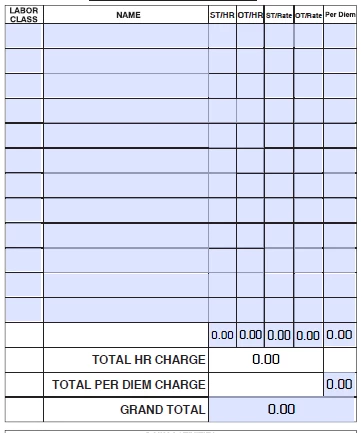
I need the following calculation to get the TOTAL HR CHARGE:
(ST_HR*ST_Rate)*((OT_HR*OT_Rate)(X))
The X being the number of rows populated in this section. So it could be from 1 to 12 but will change with each job. How do I get that into the calculation?
Please ignore the row above the Total HR Charge as that is a total of each column that I used in the original calculation but that didn't work either. I appreciate any and all help. Thank you in advance!
This is the link for the entire file https://adobe.ly/36kvxmY
 AdChoices