
boilermaker73
Inspiring
December 9, 2022
Question

Custom Keystroke Scripting Issue

  • December 9, 2022
  • 1 reply
  • 7617 views

I essentially have two scripts that work in unison on a PDF form, namely a custom keystroke script associated with a combo drop-down box and a document level function 'setFieldValues' invoked by the script (both provided below). The issue I am experiencing  is that the scripts appear to perform without issue if the script for the combo box is placed in the 'on blur' event (a poor choice at best for obvious reasons) but fail to perform as anticipated if I were to place the script associated with the combo box as a custom keystroke script with the addition of the line 'if(event.willCommit)... in which case I receive 'undefines' (refer to screen shot) for all the form fields intended to be assigned values by the scripts. One thing I noticed is that if I were to replace the index variable 'i' with a digit from 1-14, the form fields miraculously receive the values associated therewith regardless of the selection made in the combo box which is understood. This leads me to believe that for whatever reason, the index variable 'i' is not being recognized when using the custom keystroke script. Why this is, I haven't the slightest idea. Any thoughts or suggestions as to why are most appreciated. Thank you ahead of time. Scroll down to see scripts below.


/* Custom Keystroke Script (Note: 'if(event.willCommit) was intentionally removed when the script was placed and invoked from the 'on blur' event */

if(event.willCommit){
if(event.value == "Select|Lookup Name")
resetForm(["inf"]);
else
setFieldValues();
}


//setFieldValues() function

function setFieldValues(){
var i = event.target.currentValueIndices;
for(j=1;j<15;j++){
f=getField("inf."+j);
f.value=aVendors[i][j];
}
}
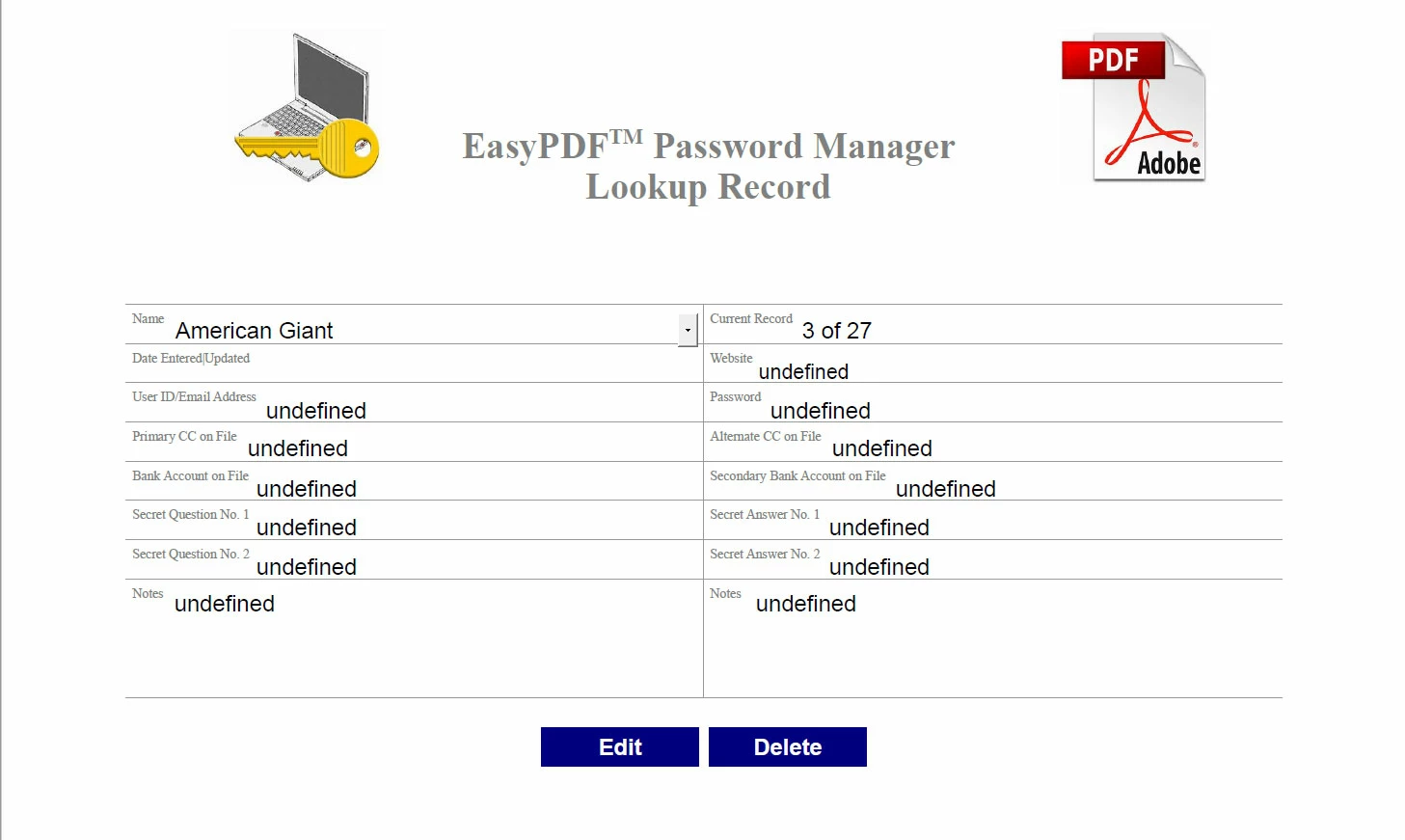

Screen shots attached for reference
 

This topic has been closed for replies.

1 reply

boilermaker73
Inspiring
December 9, 2022

Sorry but I should have also added that when using the custom keystroke script placement, I also receive incorrect values associated with the selection made in the combo box in addition to the undefines. Once again, this makes me believe that for whatever reason the information to be provided by the index 'i' variable in the script remains suspect.  

Thom Parker
Community Expert
Community Expert
December 9, 2022

The "currentValueIndices" property is not set until after the selected value is committed. This is true for all field properties related to the field's value. It's instructive to place console.println code in the events to display values of interest, then watch what happens in the console as you make selections. You can see exactly how the values change and when. 


But using the item index is not the best method. The list item index is not a reliable way to relate the list selection to the item values in the array, because they can get out of sync. A more reliable method is to include the item name in the data. There are two ways to this, include it as an item in the array, or switch out the array for an object.  

My first choice would to store the data as an object, where the member names would be the selection value from the dropdown. And the member values would be the array of field values.  Then access to the array of "inf" field values is automatic: 

The code will now look like this


f.value = aVendors[event.value][j];


I would also opt to use an object for the field values, rather than an array, so the fields could be named for what they are. And the relationship between the value and the field is more reliable.


The data when converted to a string would look like this.


var oVendors = {"American Giant":{website:"dfasdf",password:"dfasdf",....},

                              etc.

                           }


Then the field names are "inf.website", "inf.password", etc.   


Not a particularly compact way to store data, but very verbose and direct.


Thom Parker - Software Developer at PDFScriptingUse the Acrobat JavaScript Reference early and often
boilermaker73
Inspiring
December 11, 2022

In answer to 'The "currentValueIndices" property is not set until after the selected value is committed...'. Thank you, I honestly wasn't aware not to mention that your recommendation regarding use of the console in this manner would have undoubtedly given me the answer as to why I was experiencing what I thought to be odd behavior to begin with.

As for using the index and array combination, I have already made provision to keep the names in alphabetical order in both the combo box and array pending addition, deletion, or modification of the array. As such I haven't yet experienced the array being out of sync with the list as the index numbers have remained in sync thus far given the script created/used. In reality, I also feel more comfortable not to mention I am altogether more familiar with and seem to fare better using arrays. I have provided the script below that I created to populate the fields based on the combo box selection for your opinion. I also added/placed the script in a dummy text field along with the script that creates the array for storing the data in the custom script. While this appears to be working like a charm so far, I realize you may still not agree for reasons I remain unaware of in which event once again your professional opinion regarding this subject matter is most appreciated. Unless I am missing something, I don't readily see how the array and list can become out of sync if I am able to maintain the same index between the array and list. Please let me know otherwise. 

f=getField("cbNames");
var i = f.currentValueIndices;
for(j=1;j<15;j++){
cField=getField("inf."+j);
if(i!=0)
cField.value=aVendors[i][j];
else
cField.value="";
}