Inspiring
January 16, 2023
Answered

Date in Acrobat / Problem No. 3 …

  • January 16, 2023
  • 4 replies
  • 4249 views

It is a real pain to work with Date-functions in PDFs if you are supposed to use the “dd.mm.yyyy” Syntax (which is common standard in German-Language Countries and afaik in many other countries too, but apparently unknown to Adobe-Developers….) I remember having these problems back in the 1980ies when working with US-programms. And I’m really … that I run into these ancient problems again using Adobe in 2023!!! Sorry for this prologue …


Now. Next problem with date():

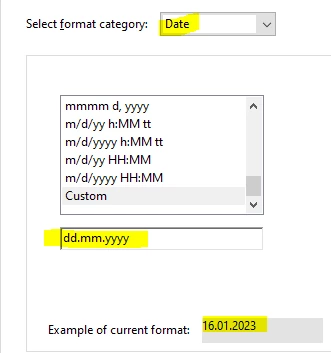
I have a field, defined as date “dd.mm.yyyy”:


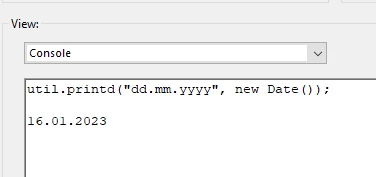
I want to assign a default-value for this field. The following command returns the date in the wanted format:


Now I thought – just put this as Default Value:
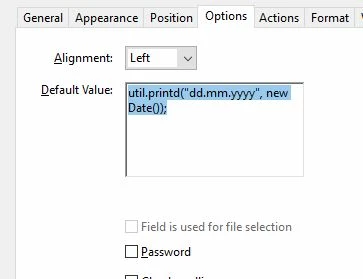


And I guess every other program in this world would gladly accept a default-value in exactly the same format that is specified for this very field – but unlike Acrobat:
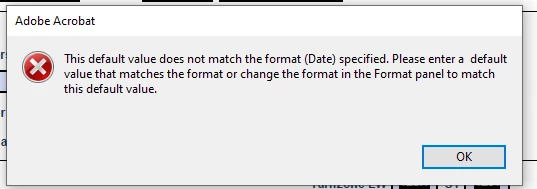


Something wrong with ME?

This topic has been closed for replies.
Correct answer Bernd Alheit

You can't use a script as default value.

Use a date like: 01.01.1980


Or set the default value at document open with the script.

4 replies

GGNAuthor
Inspiring
January 17, 2023

Well actually there were many good answers. But @Bernd Alheit was the first one to mention the alternative way.

And I'm still reluctant to use document level script. So I ended up with a script in the field-action / On Focus:


if (this.getField("Beginn").value == "") {this.getField("Beginn").value=this.getField("datumheute").value;}

//datumheute is an existing field that already calculates the current date for other purposes too


Thank you all! For the other issues discussed - especially my struggels with converting or calculating dates in JS and the Pro-Reader problem I better start separate tickets.

JR Boulay
Community Expert
Community Expert
January 17, 2023

In any case everyone should consider this:

😉


Acrobate du PDF, InDesigner et Photoshopographe
try67
Community Expert
Community Expert
January 17, 2023

There's always an XKCD... 🙂

JR Boulay
Community Expert
Community Expert
January 17, 2023

"(which is common standard in German-Language Countries and afaik in many other countries too, but apparently unknown to Adobe-Developers….)"

This is because you're using Acrobat in English language.

I have the same issue with the French date format (dd/mm/yyyy), it's only available when I use Acrobat in French language.

So, I assume that the German date format should be available when using Acrobat in German language.


Acrobate du PDF, InDesigner et Photoshopographe
GGNAuthor
Inspiring
January 17, 2023

Thank you @JR Boulay !

I'm using the English Version on one and the German on another Computer. When posting on this forum I usually take the Englisch one.

Regarding the Date-Format, It's true, there are diffferences, but even in the German version they offer "tt/mm/yyyy" and "tt-mm-yyyy" which come pretty close, but are still unusual in Germany.

bebarth
Community Expert
Community Expert
January 17, 2023

Hi,

You can use a date format in German (or another language) whatever the language of the software!

For a German format: event.value=util.printd("date(de){DD.MMMM YYYY}",new Date(),true);
For the same in French: event.value=util.printd("date(fr){DD.MMMM YYYY}",new Date(),true);

...in Spanish: event.value=util.printd("date(es){DD.MMMM YYYY}",new Date(),true);

...in English: event.value=util.printd("date(en){DD.MMMM YYYY}",new Date(),true);

...etc

Below with FrenchAcrobat version, the date in German, English and Spanish.

@+


Bernd Alheit
Community Expert
Bernd AlheitCommunity ExpertCorrect answer
Community Expert
January 16, 2023

You can't use a script as default value.

Use a date like: 01.01.1980


Or set the default value at document open with the script.

GGNAuthor
Inspiring
January 17, 2023

Thank you @Bernd Alheit!

I don't want to set a fixed date. The field should be filled with the current date. But that means you can't use a calculation to set a default value? I can't believe it ... and why doesn't Adobe care to display more precise error message?

Well, guess I have to find another way ... I had the experience, that document scripts sometimes don't work in Reader. So maybe I give the "Actions" a try.

Nesa Nurani
Community Expert
Community Expert
January 17, 2023

You can use a document level script to fill in a new date in that field every time you open a document.