date not showing when creating a custom name stamp
Hi,
I am trying to help a user at my organistaion with custom name stamps.
The user previously had Adobe Acrobat DC 2017 installed on her PC and now we have installed Adobe Acrobat DC subscription model on her PC. I tried copying the source files for the name stamps from the user's old PC to their new one but it's not working as it should. However, the name stamp shows under the stamp list in Adobe.
This is what it looks like on her old PC where the date changes everytome she uses it.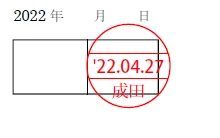
But after copying the stamp files from her old PC to new one, the name under the date is garbled text but the date shows correctly.
Please recommend ways to fix this.
I also tried creating new stamp for her by cropping only the circle without the date and her name. I used the prepare form tool to do so but the date doesnt show when I use the stamp. I followed t his guide https://helpx.adobe.com/acrobat/kb/create-custom-dynamicstamp.html to create the stamp.
 AdChoices