


michellem82087816
Participant
August 9, 2017
Answered

Date picker field in forms using Acrobat Pro DC

  • August 9, 2017
  • 2 replies
  • 71394 views

I wish to insert a date picker field in my form using Acrobat Pro DC (version 2017.012.20093) and although it shows in tutorials that this is now available in 2017 forms (see below), I do not have this option.  Currently when I insert a calendar field and open properties, I only see the following:
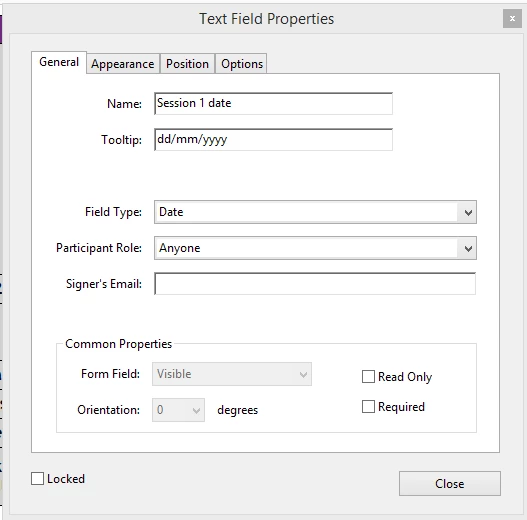
Can you help?

Form authoring: Along with the Image field, the Prepare Form tool also supports the addition of a Date field in a single click with the January 2017 release. This is also not a new field type; it's a text field, with the Format set to Date.

Date fields created using this method have _af_date appended to the field names to identify them as date fields.

Date field

Form filling: The January 2017 release includes support for Date picker for Date fields in both Acrobat and Reader. This is not tied to the new Date field; if you have an existing form, which has a text field, with the Format set to Date, the Date picker arrow icon appears when you bring focus on the field. Clicking the icon opens up the Date picker. After you select a date, the Date picker formats it according to the format specified by the author and enters that in the field.

Correct answer George_Johnson

The date picker is not supported for Adobe Sign compatible forms, which is what you've created. The are supported for normal Acroforms, which you can convert to by selecting: More > Revert to Acrobat Form

in the right-hand pane while in form editing mode.

2 replies

michellem82087816
Participant
August 9, 2017

Thank you so much George_Johnson.

One final question if you don't mind, it is possible to custom format so it shows the day of the week, e.g. Wednesday, 09/08/2017

Bernd Alheit
Community Expert
Community Expert
August 9, 2017

As custom format use:

dddd, dd/mm/yyyy

michellem82087816
Participant
August 9, 2017

Thank you so much for you help

George_JohnsonCorrect answer
Inspiring
August 9, 2017

The date picker is not supported for Adobe Sign compatible forms, which is what you've created. The are supported for normal Acroforms, which you can convert to by selecting: More > Revert to Acrobat Form

in the right-hand pane while in form editing mode.

Inspiring
September 10, 2018

I 'was' supported for sending documents for signature via the online process (not from within Acrobat DC) until sometime over the past couple weeks. (Which is really stupid)