
Known Participant
July 28, 2021
Question

Decimal places showing as 3 when it should be 2

  • July 28, 2021
  • 3 replies
  • 1648 views

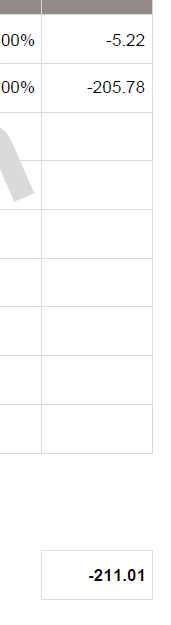
I have a document that is using the built in calculations to calculate netAmt x VATValue and I have the total field format set to 2 decimal places, but acrobat has added a third place! You can see it when you click on the field, but it doesn't show otherwise.

The example below for instance should total -211.00, but because of the 3rd decimal, it's showing as 211.01 which is causing major issues.The field are protected so the sums are automatic, so the user can't overtype.

Is there anything I can add to the fields that will force only 2 decimal places?
 

This topic has been closed for replies.

3 replies

jlehaneAuthor
Known Participant
July 29, 2021

I've tried looking for what I need but I really have no idea! This is what I'm trying to calculate:


NetAmt x VatRate = VATAmt 

The total (VATAmt) needs to be rounded to 2 decimals (and the field needs to be blank, not showing 0 if the earlier fields are empty)


jlehaneAuthor
Known Participant
July 30, 2021

Not sure if it's the right way, but it seems to work ....

The multiplication part stays using the simplified calulations, and I've added the following to the custom validation script box:

event.value = util.printf("%.2f", event.value);

try67
Community Expert
Community Expert
July 28, 2021

You have to actually round the numbers to 2 decimals, not just use the Format option, which only affects how the value is displayed.

Bernd Alheit
Community Expert
Community Expert
July 28, 2021

How does you calculate the values?

jlehaneAuthor
Known Participant
July 28, 2021

Using the basic built in calculation function (add, subtract, multiply and divide)

Bernd Alheit
Community Expert
Community Expert
July 29, 2021

Use scripts for the calculations and round the results.