
Participating Frequently
September 6, 2024
Answered

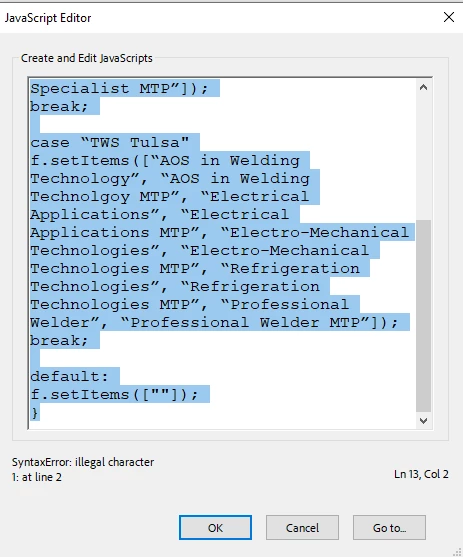
Dependent Dropdown JavaScript Syntax Error

  • September 6, 2024
  • 1 reply
  • 1076 views

I pulled up instructions to write JavaScript to make a dependent dropdown but I keep getting a syntax error and I can't figure it out. Can someone help? I've never done this before so forgive me for missing the obvious. Thank you!

var f = this.getField(“Program”);
switch(event.value){
case “RSI - The Refrigeration School"
f.setItems([“AOS in Mechanical Maintenance Engineering”, “AOS in Mechanical Maintenance Engineering MTP”, “Electrical Applications”, “Electrical Applications MTP”, “Electro-Mechanical Technologies”, “Electro-Mechanical Technologies MTP”, “Refrigeration Technologies”, “Refrigeration Technologies MTP”, “Welding Specialist”, “Welding Specialist MTP”]);
break;

case “TWS Tulsa"
f.setItems([“AOS in Welding Technology”, “AOS in Welding Technolgoy MTP”, “Electrical Applications”, “Electrical Applications MTP”, “Electro-Mechanical Technologies”, “Electro-Mechanical Technologies MTP”, “Refrigeration Technologies”, “Refrigeration Technologies MTP”, “Professional Welder”, “Professional Welder MTP”]);
break;

default:
f.setItems([""]);
}
 

This topic has been closed for replies.
Correct answer Nesa Nurani

@Thom Parker I'm wondering if you know if it's possible to populate a numeric formatted text field from a dropdown selection? For example if I selected 'milk' in a 'groceries' dropdown list it would populate '$2.00' in a 'Cost' number formatted text field. I tried the script below and the 'Tuition' field doesn't populate. I also tried changing to a 'Tuition2' dropdown and entering the dollar amounts as a list in options but it keeps giving me formatting errors for the number no matter what change the options to. Thank you!


var f = this.getField("Tuition");
switch(event.value){

case "Professional Welder":
f.setItems(["$18,700"]);
break;

case "Professional Welder MTP":
f.setItems(["$16,830"]);
break;

case "Welding Specialist with Pipefitting":
f.setItems(["$22,650"]);
break;

case "Welding Specialist with Pipefitting MTP":
f.setItems(["$20,385"]);
break;

case "AOS in Welding Technology":
f.setItems(["$17,500"]);
break;

case "AOS in Welding Technology MTP":
f.setItems(["$15,750"]);
break;

case "Electrical Applications":
f.setItems(["$16,900"]);
break;

case "Electrical Applications MTP":
f.setItems(["$15,210"]);
break;

case "Electro-Mechanical Technologies":
f.setItems(["$19,700"]);
break;

case "Electro-Mechanical Technologies MTP":
f.setItems(["$17,730"]);
break;

case "Refrigeration Technologies":
f.setItems(["$16,900"]);
break;

case "Refrigeration Technologies MTP":
f.setItems(["$15,210"]);
break;

case "Electrical Lineworker":
f.setItems(["$13,750"]);
break;

case "Electrical Technologies":
f.setItems(["$16,900"]);
break;

case "Electrical Technologies MTP":
f.setItems(["$15,210"]);
break;

default:
f.setItems([""]);
}


If you are populating a text field you can't use setItems(), that is for dropdown fields, instead use like this:
f.value = "$18,700";

1 reply

Thom Parker
Community Expert
Community Expert
September 6, 2024

There are two types of errors in the code.

1) Bad quotes.  In JavaScript the plain ASCII quote must be used  " instead of 

2)"Case" statements end with a ":"   Check the Core JS reference for syntax specifics.  

Here's what it should be (except I didn't fix all your quotes, you'll need to do that):


var f = this.getField("Program");
switch(event.value){
  case "RSI - The Refrigeration School":
    f.setItems(<replace quotes>);
    break;

  case "TWS Tulsa":
    f.setItems(<replace quotes>);
    break;

  default:
    f.setItems([""]);
}


Thom Parker - Software Developer at PDFScriptingUse the Acrobat JavaScript Reference early and often
Participating Frequently
September 6, 2024

@Thom Parker I would have never gotten the ASCII quotes. I really appreciate your help and explanation. Thank you!