
Participant
July 11, 2024
Answered

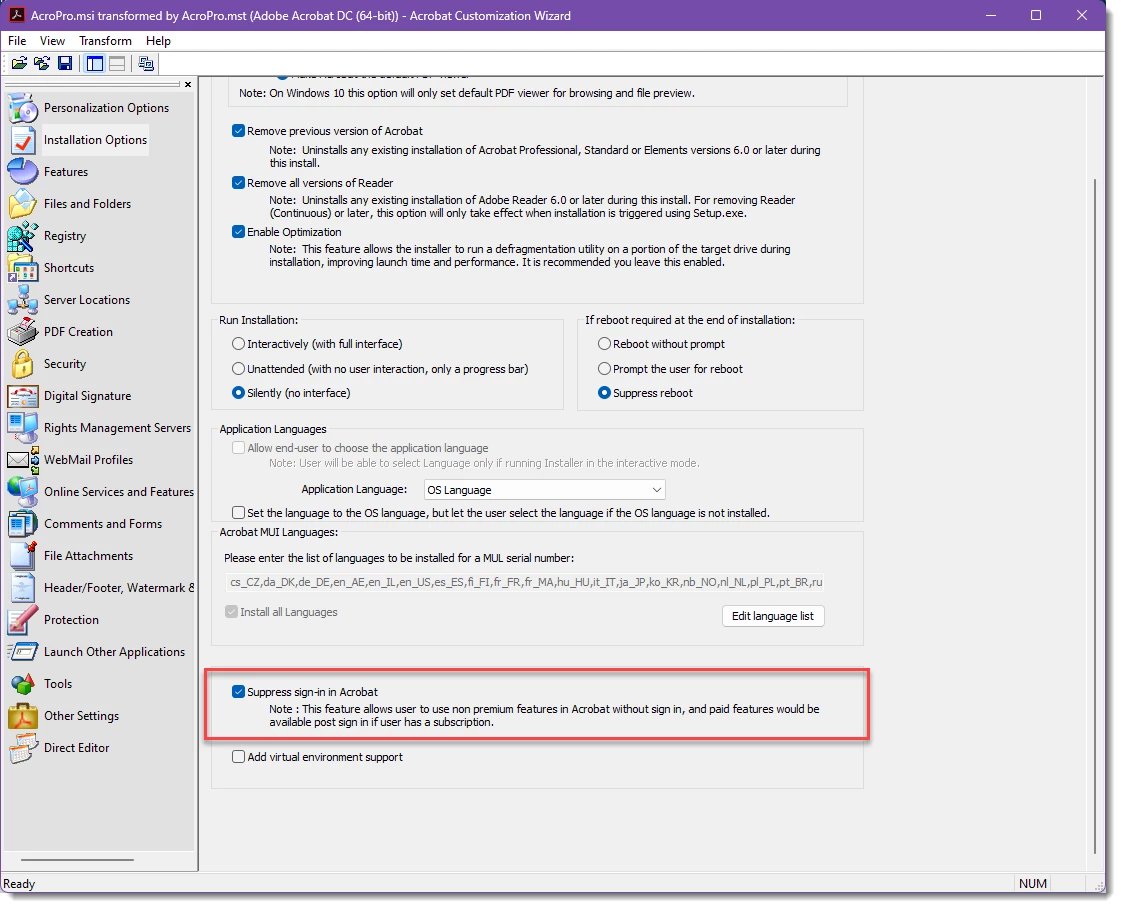
Deployment - Acrobat Customization Wizard - 'Suppress sign-in in Acrobat' not working

  • July 11, 2024
  • 2 replies
  • 1513 views

I'm using the Acrobat Customization Wizard to customize our Adobe Acrobat Pro DC installation.
From my understanding Adober Reader and Adobe Acrobat is now combined in a unified installer and you get access to paid features if you are subscribed and signed in. 


We need our users that don't have a subscription be able to skip the sign-in and be able to use the free features while our users that have a subscription should be able to sign in manually.


For some reason the the suppress sign-in in Acrobat option in Acrobat Customization Wizard doesn't seem to do anything. Still prompted for logon when Adobe Acrobat is launched. If you close the logon window the application will exit. All other options we have used customized with the wizard are working as intended.
 

This topic has been closed for replies.
Correct answer Amal.

Hi there


I hope you are doing well.


If you are experiencing any issues with your work computer, and it is managed by your company's IT department, I recommend contacting your IT administrator. They have the ability to raise a support ticket through the Admin console, ensuring that your issue is directed to the dedicated support team for prompt and efficient assistance.


This process ensures that your problem is handled by the appropriate team, leading to a quicker resolution


Regards,

Amal

2 replies

Community Manager
August 13, 2024

Hi @Johnny256692884iiq,

Following up to know if your problem is resolved or not.

~Tariq 

Participant
August 14, 2024

Hi Tariq,

Thank you for reaching out. We haven't solved the problem yet and decided to postpone using Adobe Acrobat Reader and Adobe Acrobat Pro DC as an unified app due to other concerns.
Any suggestions you might have are welcome in case we redecide in the future.


Kind Regards,
Johnny Mongstad

Community Manager
August 14, 2024

Hi @Johnny256692884iiq


Thank you for the response.


I am a bit out of touch with the deployment topic. However, I will send you an email to the email ID registered in the Community. I need a bit more information before I can suggest anything to you. 

~Tariq

Amal.
Community Manager
Amal.Community ManagerCorrect answer
Community Manager
July 19, 2024

Hi there


I hope you are doing well.


If you are experiencing any issues with your work computer, and it is managed by your company's IT department, I recommend contacting your IT administrator. They have the ability to raise a support ticket through the Admin console, ensuring that your issue is directed to the dedicated support team for prompt and efficient assistance.


This process ensures that your problem is handled by the appropriate team, leading to a quicker resolution


Regards,

Amal