
Participant
June 15, 2022
Answered

Device Activation limit reached

  • June 15, 2022
  • 2 replies
  • 2264 views

On my worklaptop i have a licence for Adobe acrobat pro. I'm activeted this in the application bij loggin in.

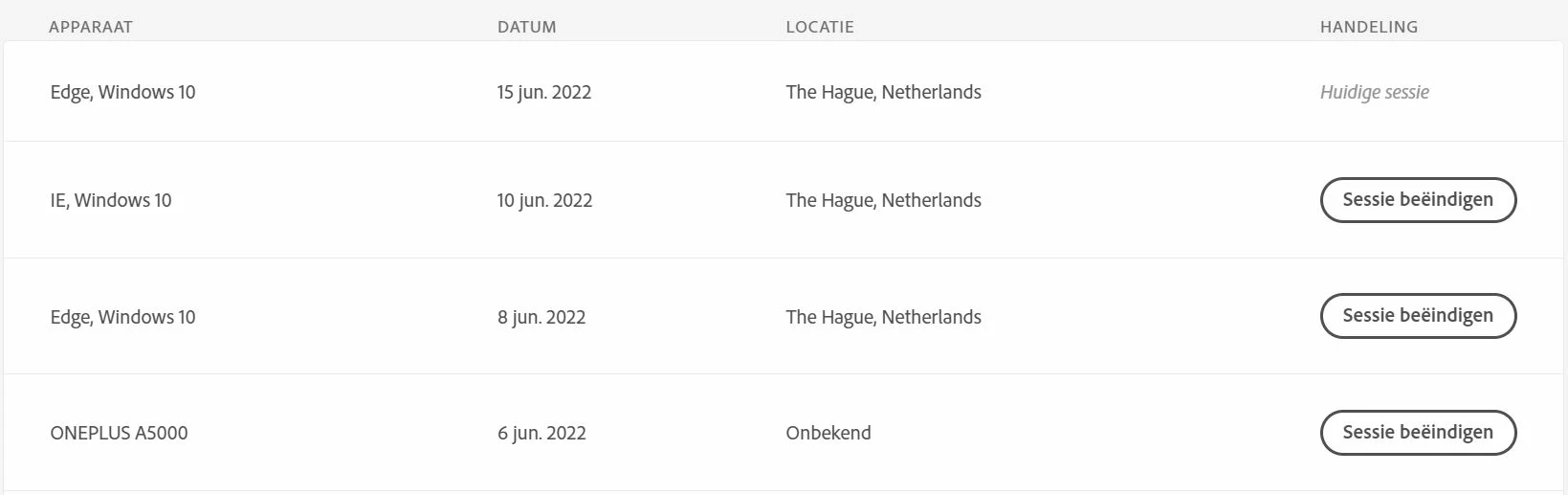
But everey time i open Adobe Acrobat pro i get a popup telling me i have reached my device activation limit. I only use it on my laptop. When i go te the site ofe Adobe i can see my laptop and also Edge/windows is a session (see attachmend). How can i solve this problem? When i end all sessions the Edge/Windows stay's active instead of mij laptop. For security reasons my Citrix session and laptopnumber arend't in this picture, but they are also under the OnePlus activation
 

This topic has been closed for replies.
Correct answer JR Boulay

Deactivate all devices in this list, then reactivate your laptop.

2 replies

Meenakshi_Negi
Legend
June 15, 2022

Hi Paula,


Thank you for reaching out.


Adding to the above suggestion.

If you still experience the issue, please contact the phone support team. They might help you with the activation limit issue.

You may contact them via the number provided for your region on the following help page: https://helpx.adobe.com/contact/phone.html.


Thanks,

Meenakshi


Participant
June 15, 2022

indeed, when i deactivate all, they come back 😞

Participant
June 23, 2022

Thank you topic can be closed

JR Boulay
Community Expert
JR BoulayCommunity ExpertCorrect answer
Community Expert
June 15, 2022

Deactivate all devices in this list, then reactivate your laptop.

Acrobate du PDF, InDesigner et Photoshopographe