
Participant
May 13, 2020
Question

Different multiple Signatures, unknown recipients

  • May 13, 2020
  • 3 replies
  • 2587 views

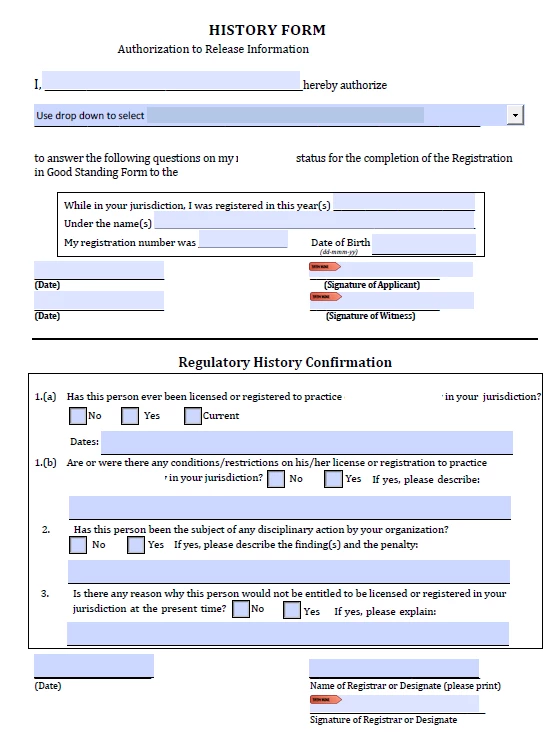
I have designed some fillable forms using Adobe DC Pro.  All forms will be saved and put on our website so they can be downloaded and completed. One of the forms requires the individual to complete the top half of the page, sign and send to 1 of the 9 available organizations authorizing release of their information.  Once that organization recieves, I'd like them to be able to use the fillable feature to complete the bottom half, add their signature and then send back to us. 


Is there any way for this to happen?  For 1 person to complete a portion, sign and send and another person to complete, sign and then send. 


Form example below with redacted info. 
 

This topic has been closed for replies.

3 replies

Thom Parker
Community Expert
Community Expert
May 20, 2020

What does that mean, "Sign in one location?"

Fully describe your intended workflow.

Thom Parker - Software Developer at PDFScriptingUse the Acrobat JavaScript Reference early and often
Thom Parker
Community Expert
Community Expert
May 15, 2020

I would suggest you look into making this an Fill & Sign form. Adobe Sign has this ability built-in.  It requires no scripting, just assigning roles to each field. 

Thom Parker - Software Developer at PDFScriptingUse the Acrobat JavaScript Reference early and often
Participant
May 20, 2020

When I tried the Fill & Form, it requires me to know who its being sent to so I can assign the fields. This document ideally would be available on our website for anyone to download, fill in their portion and then send out for the remaining portion to be completed. To set it up that they need to email us for the form first so we can add assign the roles with their email address adds more work.

Its very possible I am doing something incorrectly but if I click fill and sign this is what I get.  


Thom Parker
Community Expert
Community Expert
May 20, 2020

Adobe sign can be setup to do what you want, it can also be done using the methodology suggested by try67. But neither is free or easy.

You want to perform a complex managed process. To do this you will have to spend either time or money. The type of customization you've described requires an expensive Adobe Sign subscription. 

The method suggested by try67 is also expensive, but it's a one time cost. Contact me if you are interested in a custom scripted solution.


Thom Parker - Software Developer at PDFScriptingUse the Acrobat JavaScript Reference early and often
try67
Community Expert
Community Expert
May 15, 2020

Yes, it's possible. You can set the first signature field to lock some fields, while making others editable, and then send the form to them. This will require a custom-made script, though.

Participant
May 20, 2020

This sounds exactly like what I need unfortunately outside of my skill set.