jb76662128
Participant
May 1, 2018
Question

Different Tags in Tags Panel Between Versions of Acrobat DC

  • May 1, 2018
  • 2 replies
  • 1289 views

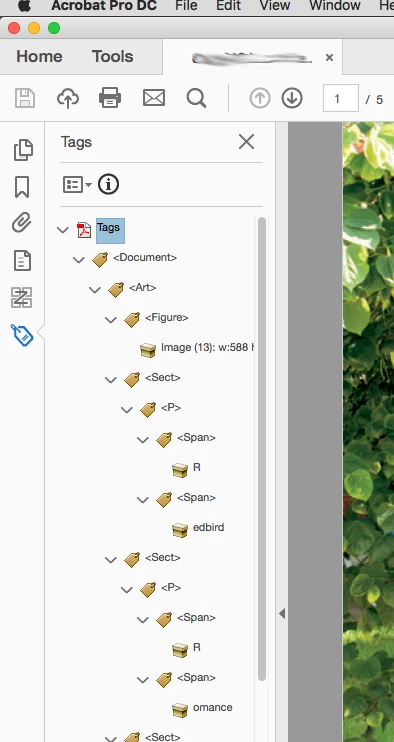
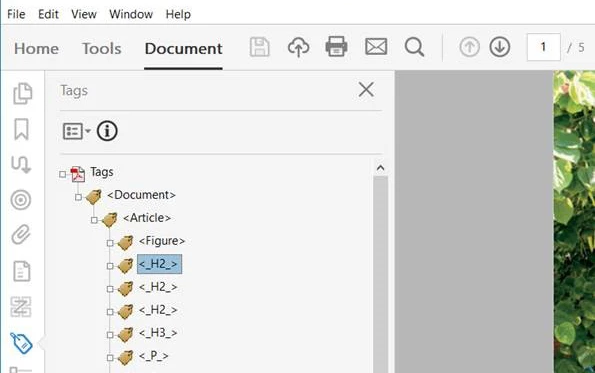
A colleague sent me a PDF exported from InDesign and when I opened the Tags Panel in Adobe Acrobat Pro DC my computer the Tags Panel list was different than my colleague's. we shared screen shots of what we both saw for the same file. We have checked this is many previous versions of Acrobat Pro IX, X, and DC (2015) on both Mac and PC. We are confused on why we see different tags in the same file.  
This topic has been closed for replies.

2 replies

Inspiring
April 15, 2019

Take a look at the Tags View Options Menu (the square icon above your tags list, and to the left of the circle i. In the bottom section of that dropdown is a check option labeled, "Apply Role Mapping to Tags." Toggle that to see if it makes a difference.

The one showing _H2_ looks like maybe it's showing the exact Paragraph Style used in InDesign rather than the associated tag. Not sure.

Inspiring
May 1, 2018

The screenshot with the H2's is most likely not from a PDF directly exported from InDesign (whereas the other one looks typical for InDesign generated tagged PDFs).

Please double check whether the PDFs are really the same files.

Ganesh_JI
Inspiring
April 15, 2019

Hi

I also have the same issue if we saw the tag in Acrobat DC it look good, but if we saw in Acrobat X or XI the tag is not like that.

PDF was created in Indesign application only.

Thanks

Ganesh.R