
Participant
July 11, 2020
Question

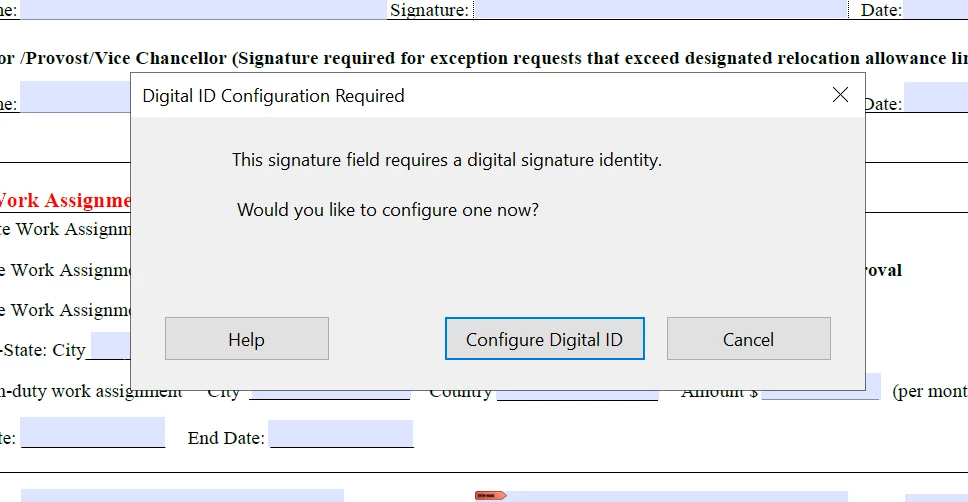
Digital ID required message when I want to sign second line with sign and fill--can't do anything

  • July 11, 2020
  • 3 replies
  • 935 views

Hello,

I have a document with two signature fields.  The first one was signed digitally by someone else.  When I go to sign the the second signature line I get a message saying it has to be a digital signature. I want to use fill & sign for the second signature.  How to I fix this?  I am basically stuck and would have to print and sign the form.  Not happy!!
 

This topic has been closed for replies.

3 replies

swapnilsrivastava
Participating Frequently
July 12, 2020


Hi There,


Thanks for reporting the issue here.

Signing capabilities are provided by someone else; maybe the issue could be from origin of PDF file.

We tried with the latest version of Acrobat, and signing with more than one person works without an issue; when signing is raised using Adobe Sign.

Please share the system details on which the issue is observed:

  • OS version installed
  • Acrobat/Reader version installed
  • Is the same happening for a single file or for all the files


Please do let us know, if anything else is required from our end.


Regards,

Swapnil Srivastava

Inspiring
July 11, 2020

The signature type required is encoded in the form field type. You could use a different field type for the second signature.

Participant
July 12, 2020

Hello,


Thanks for the replies.  I am wondering if once you set up a digital signature in Adobe, do you still have the option to use sign and fill? Will the adobe system only allow you to use the digital signature you have set up to sign a PDF?


Bernd Alheit
Community Expert
Community Expert
July 11, 2020

Use a digital signature.

Participant
July 11, 2020

Hello Bernd,

Its actually not me that is having the problem but someone several levels above me that is insisting that the document be sent to them in a different format so they can sign it.  I am looking at a way around this.  Unfortunately, when someone signs digitally it seems like Acrobat wants everyone else to sign digitally and I work in a multi generational workforce and not everyone is comfortable with digital signatures or they are signing for someone else higher up who has given them the go ahead to authorize the signature.  The message about digital ID configuration shown in my message, when you hit cancel, it doesn't let you move forward.  You are caught in a loop and just stuck.  Is there a way around this?  


Legend
July 11, 2020

What Acrobat does is absolutely right. A digital signature would be completely lost if you signed it another way. (Note: what you see on the PDF page is valueless) It won’t let you throw that away. So you really have to decide on one style of signature and enforce everyone to use it.