
Participating Frequently
April 30, 2020
Question

Digital signature; graphical appearance is "squashed" and illegilble

  • April 30, 2020
  • 2 replies
  • 4242 views

For some reason, the graphical appearance of a digital signature placed with my Adobe Reader (both Acrobat DC and the regular reader) is squashed together and unreadable.
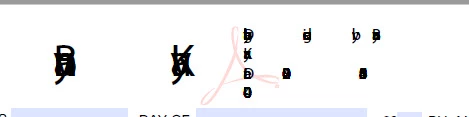
 

Any ideas on why this would be happening?


Thanks!

This topic has been closed for replies.

2 replies

Participant
October 3, 2022

Move or delete everything in the C:\Users\[Username]\AppData\Local\Adobe\Acrobat folder, if you are using Windows. Close and restart Adobe Acrobat Reader/ Adobe Acrobat Reader DC. Try to sign again, using digital certificates. See if it works.

Participant
August 20, 2020

I'm facing the same issues.

You can try with some of these solutions: https://community.adobe.com/t5/acrobat/my-signature-is-unreadable/td-p/10136608?page=1

Nothing worked for me yet.

Participating Frequently
August 25, 2020

Thanks for the info.  I never did figure this out, but have a new computer now, which resolved the issue.