
Participant
May 15, 2020
Question

Digital signature review flagging good password?

  • May 15, 2020
  • 1 reply
  • 973 views

Hi All,


A client of mine is running into a strange new issue.  Everytime he goes to digitally sign something, the "Review" box is flagging his password field as red (even after the password is typed). He then has to hit review to clear this out.  Not a major problem, but it has added an extra step to every signature for no apparent reason. Anyone know what the deal is here? To be clear, if he were to type his password in , it would still show red until he hits review. 
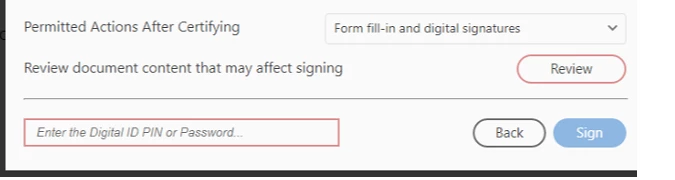
This topic has been closed for replies.

1 reply

ls_rbls
Community Expert
Community Expert
May 16, 2020

HI,


In which version of Adobe Acrobat Pro is this happening? What is the latest version update?


Can you tell if this issue started happening after a system update was applied?


Also, is this is happening with every PDF or just one particular PDF?

JM241Author
Participant
May 18, 2020

Sorry for the late reply, missed the notification in my email. It's Adobe Acrobat Pro 2017.  We have some backend access to see what the rest of the staff are on version wise, and it appears this particular person and one other staff member are on version 17.011.30171 . They appear to be the most up to date in the company, so it looks likely that this happened after an update.  The second staff member is not having the same issue though.


It is every document. They attempted creating a new signature/certificate on their own (to test) and it was doing it there as well.


Also, thank you very much for taking a look at this.

ls_rbls
Community Expert
Community Expert
May 18, 2020

Hey JM,


I tried to reproduce your issue on my end and I found a Preference setting that is related to that issue.


See slide below and compare with the computer(s) that this is happening if they  have the settings that I marked with the red square boxes configured the same way or differently :