
Participant
March 15, 2019
Question

Digital signatures not displaying

  • March 15, 2019
  • 3 replies
  • 2034 views

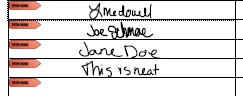
I have Adobe Acrobat Standard 2017 and have some forms that were filled out using an iPad with actual signatures using the touch screen. When I open the file in Adobe Reader - everything is fine. But when I open the file with Acrobat all the signatures disappear.

This:
Turns to this:
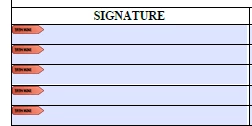
However if i PRINT the same PDF the signatures will print.

I already tried going to View > Show/Hide > Navigation Panes > Signatures and it shows them all as blank unsigned signature fields.

I assume this has to be a display issue but I can't figure it out.

This topic has been closed for replies.

3 replies

Bernd Alheit
Community Expert
Community Expert
March 20, 2019

Use Adobe Acrobat or Acrobat Reader on a Windows system or Mac to sign the signature fields.

FDTAdminAuthor
Participant
March 19, 2019

I still need help with this.

It's got to be a display issue - since the signatures print just fine... HELP PLEASE!!!!

Inspiring
March 20, 2019

I will conjecture that Xodo just created an Appearance for the signature field, but did not actually do a digital signature, and did not change the AcroForm SigFlags entry to indicate that there are digital signatures. Acrobat is seeing that the field does not have a real digital signature, and doesn't render the Appearance. It's  not clear why Acrobat and Reader would behave differently, since they share the same code base for a given machine type. The tablet and phone readers are from different code, however.

If you just want to have a Text signature, use a Text field.

Inspiring
March 20, 2019

I looked at the Xodo site, and it appears that they only do annotations of various types. It's possible that their "signature" annotation (which is not a digital signature) is underneath the Acrobat signature field, and is covered by Acrobat when rendering the signature field. It shows up when printing because the ink is a logical OR of the field appearances. You will need to have Xodo fix this problem.

FDTAdminAuthor
Participant
March 15, 2019

A little more clarification:

I used the Xodo app to fill out the forms and create the signatures.