Participant
January 9, 2025
Question

Digitalni certifikovany podpis

  • January 9, 2025
  • 3 replies
  • 1319 views

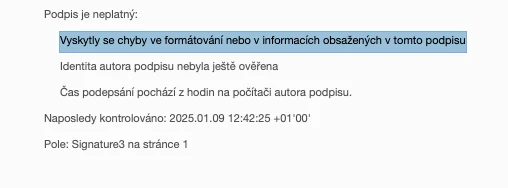
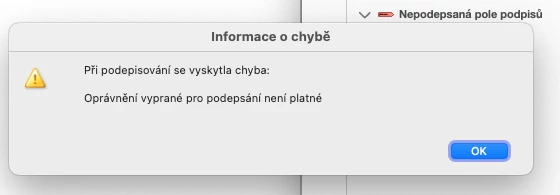
Zdravim, resim problem s podepisovanim dokumentu v Adobe Pro. Certifikat pro podpis vydan Postsignum. Operacni system MAC OS, pocitac deskotp Mac MINI. V klicence naisntalovan certifikat a vsude je jako "duveryhodny". Postupoval jsem dle navodu Adobe a pri vyberu podpisu, naslednem kliknuti na podepsani pri ukladani dokumentu hodi hlasku: Pri podepsiovani se vykytla chyba. Opravneni vyprane pro podepsani neni platne. Viz obr., a dokuemnt se nepodepise. Ten stejny certifikat mam nainstalovany na Mac Book Air a tam vse funguje. Nevite nekdo, kde by mohl byt problem s nastavenim? Dekuji, P. 
3 replies

Pleskot Lukáš
Participant
May 20, 2026

How to Fix PDF Signing Issues on macOS

If Adobe throws an error when you try to sign a document, it is often caused by a conflict with an old or corrupted certificate stored in the system. This straightforward method bypassing the system keychain will get it working immediately.

Step-by-Step Guide


1.Clear the System Keychain:

Open the Keychain Access app on your Mac. Locate the old or invalid certificate that is causing the issue, right-click it, and select Delete. This prevents Adobe from trying to use the broken key.

2.Open Your Document in Adobe:

Launch Adobe Acrobat and open the PDF document you need to sign. Go to the Tools center and select Certificates, then click Digitally Sign.

3.Load the Certificate Backup:

When prompted to select a Digital ID, choose the option to add a new ID from a file. Browse to the location where you have a valid backup of your certificate saved (usually a .pfx or .p12 file).

4.Enter Password & Sign:

Enter the password you created when you originally backed up (exported) this certificate. Click Sign, choose where to save the signed file, and your document is ready.


Pro Tip: If you don't have a backup file yet, you can usually download your certificate again from your Certificate Authority's portal. Just make sure to save it in a safe place and remember the password you set during the download.


Participant
September 8, 2025

Hi,

addressing the "the credential selected for signing is invalid" issue on digital certificate signatures on MAC OS 15+


After 2 days of struggle when nothing on this forum or elswhene on the interned helped I celebrate success!


What did the job for me was:


Go to: ~/Library/Keychains (run by cmd+space and write ~/Library)

Delete everything in the folder. (Requests sign in to icloud after next login, but no issue elswhere done by many users before)


Seems like something got wrong with update to Mac OS 15 where Keychain app is replaced by Passwords.


Hope this helps!


For other Czechs around:


Ahoj,

řešení problému "Oprávnění pro podepsání není platné." u digitálních certifikátů PostSignum na macOS 15+

Po dvoudenním boji, kdy mi nic na tomto fóru ani jinde na internetu nepomohlo, slavím úspěch!

Co mi pomohlo

Přejděte do: ~/Library/Keychains (otevřete pomocí cmd+space a napište ~/Library)

Smažte vše v této složce. (Po dalším přihlášení se objeví požadavek na přihlášení do iCloudu, ale jinak není problém, jak to udělali uživatelé před vámi)


Zdá se, že něco selhalo při aktualizaci na macOS 15, kdy byla aplikace Keychain nahrazena aplikací Hesla.


Snad pomůže!

Participant
September 8, 2025

PS: 

After this reset, create the signature again from a file in Acrobat Reader.  If using Isignum, export as a PKCS file and save it locally. Use this file in Acrobat. Do NOT export to keychain.


Po tomhle resetu otevřete iSignum, exportujte podpis jako soubor PKCS někam na disk (třeba do Documents) a v Acrobat Reader dejte normálně použít certifikát a vyberte tento soubor. NEexportujte do Keychain.


Participant
October 21, 2025

Díky moc nechápu, že to nikdo nevyřeší za skoro rok problému. Hodinu jsem tim ted stravil

Legend
January 9, 2025

Hi @petr_3845


Sorry for the troubled experience.

There could be a couple of ways due to which the issue may get resolved for you. 


Let us know if this helps

.


~Tariq

petr_3845Author
Participant
January 9, 2025

Hi Tariq, the second URL is not valid: Can you please resend

Adobe Employee
January 27, 2025

You may try this link - http://bit.ly/3EcDv7X

Wanted to know, if the issue is resolved after following the solution in mentioned links.