ianc46124884
Participant
October 4, 2018
Question

Disable or remove Share button new to Acrobat DC

  • October 4, 2018
  • 16 replies
  • 34845 views

After the last update 2018-09, this bright blue Share button appeared. 
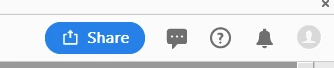
And then a pop-up comes telling me what it can do for my life.

How can we hide the button or at least disable the pop-up

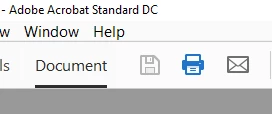
If I want to share, I will press the e-mail button that was already there, beside print:
16 replies

Participating Frequently
October 8, 2018

Or at the very least make it WORK. Passing the pointer over it gives me the demo. Clicking it gives me the demo (I’m on MacOS btw). Ideally we could remove the tool from the toolbar.

That users are resorting to coding on their own to fix this mess should tell you something: Adobe.

Some ideas can be grown into, eg cloud and recurring licensing.

Some ideas simply are bad! The share button is the latter category.

Adobe Employee
October 9, 2018

Thanks for providing your feedback and sorry for the inconvenience caused to you. While we look into the issue, you can follow the steps in the below article to use the email icon to send PDF directly as email attachment.

Link : How to use the email icon to directly send file as attachment

Hope this helps. Thanks.

Participating Frequently
October 9, 2018

Mr. Gupta:

Thank you for listening and for the quick patch. Works for me.

Participating Frequently
October 8, 2018

Thank you for posting this!

C'mon Adobe, chime in here anytime and explain why you took a simple one-step process and turned it into a three-step process. That is certainly NOT an improvement! Please listen to your constituents and put this back the way it was. Or, at the very least, allow the "share" button to be customizable to what the user wants as well as movable so that big blue (and unnecessary) button can be moved to a location the user prefers. You guys didn't think this one through!

try67
Community Expert
Community Expert
October 8, 2018

I've developed a tool that replaces the "Share File" menu item under "File" with a "Quick Send" button that will automatically generate a new email and attach the current file to it, bypassing the super-annoying (and slow!) Share panel.

If you're using Acrobat you can also add it to the Quick Tools menu, for extremely fast access, and there's a keyboard shortcut to the menu item (Alt+F, Q), if you're on Reader.

You can get it for FREE here: Custom-made Adobe Scripts: Acrobat / Reader 2019 -- Quick File Send Button (FREE)

Participant
October 22, 2019

Hi,

Since the latest update this fix no longer works.

Participating Frequently
October 8, 2018

Exactly on the last two posts.

It’s not just THAT it was done either; it’s the WAY it was done!

it was tossed on without thought. There’s no way to hide it. The response area extends beyond the edge of the button so clicking NEAR it triggers it.

And whatever you do, do NOT pass over it with the mouse pointer! That stupid annoying demo that just won’t die.

it doesn‘t end there though. In order to slap this button on you’ve removed my toolbar settings. Icon buttons for actions I NEED have to be recreated.

I’ve been using Acrobat since version 6. I switched to Acrobat from Djvu.

Many companies have made Adobe’s mistake; innovation for the sake of it without regard to the user base

Apple did it when they dumped Jobs and went with System, nearly to the company‘s death. Microsoft did it with windows 8. Both survived Only by making Reversions.

The very same thing Adobe is doing here killed OpenOffice.

AND 3 of the 5 forks.

Djvu is still out there. It’s supported by the largest archive in human history (The Internet Archive).

Djvu is a better format with inferior software.

smaller files, better quality display, greater control over Layers.

Make many more mistakes like this in implementing new “features“ and you may see an exodus to the old standard.

Participating Frequently
October 5, 2018

this Has to go. It’s directly over the tools menu On the right side. Every time I mouse over it gives me pop ups and notes and gets in the way.

In the more visual would, it’s also a glaring blight on the rather friendly design and layout.

like some 20-something on the development team thought it would be good and stuck it there without any thought to the rest of the program’s users!

Adobe is just the latest mega company that needs to STOP with all this social interaction stuff.

Adobe has collaboration tools already and if I wanted to use them I’d buy them.

I’m still adjusting to the mess of redesign from the move to DC from the standard “boxed” app.

Much more of this and I’ll end up dumping my CC/DC subscription and going back to the last lifetime version.

There’s nothing make or break in DC/CC that makes it stand out from X.

Participant
October 6, 2018

Agree 100%.

I really have come to the opinion that Adobe doesn't understand the part of its user community that has a real need to be productive. I may have a need for Adobe pro right now, but I will not buy any other Adobe products. They upgraded my software and in the process, I had to reset the menu back to the way I like it ... something so simple as preserving the end-user's menu layout ... they can't seem to get it right ...  I am sure getting tired of their "new" and "non-productive" updates.

Cheers,

- Pete

theresaw23641767
Participant
October 4, 2018

We send PDFs marked up but do not save them with the markup. We used to be able to email a marked up PDF without saving it. We can no longer do that. Has anyone found a way around that?

Participant
October 4, 2018

Problem is that when you press the e-mail button it will open that share menu... So you have to use it.

We also have problems that the send as attachment does not work when viewing the pdf inside an application. With a rollback to the previous version it resolves that issue.

ianc46124884
Participant
October 4, 2018

A good answer  to yet another 'improvement' that gets in the way of a day's work.  I hope the pop-up gives up soon.