


Participant
June 17, 2024
Question

Disable photo edit popup in Acroban

  • June 17, 2024
  • 5 replies
  • 694 views

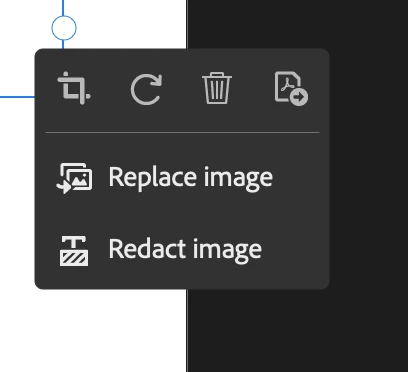
How do I disable this annoying popup when I'm in edit mode in Adobe Acrobat. Every time I click on something in edit mode it pops up. It's annoying because it often covers things I need to see. They'd be helpful in the sidebar but not as a pop-up. It seems to be a recent feature that came with the recent updates. I don't want it or need it, but there doesn't seem to be a "hide" option like there is in the new popup bars in illustrator or indesign.


I'm using Adobe Acrobat Pro Continuous Release Version 2024.002.20857 on Mac OS Ventura 13.6.6 
 

This topic has been closed for replies.

5 replies

Participant
September 15, 2024

It is quite possibly the most irritating, inconvenient pop up in the world today - please sort it out Adobe.

JR Boulay
Community Expert
Community Expert
June 23, 2024

Try to revert to the Classic UI: https://community.adobe.com/t5/acrobat-discussions/acrobat-2023-how-to-revert-to-classic-gui-user-interface/td-p/14052807
Consider the "new Acrobat" as a beta version, many features are still missing or half-implemented.

Acrobate du PDF, InDesigner et Photoshopographe
Participant
June 22, 2024

how do I disable on adobe acrobate its extremely annoying and prevents from doing the work faster because it get in the way

try67
Community Expert
Community Expert
June 20, 2024

[Moved to the Acrobat forum]

Adobe Employee
June 20, 2024

Hi @Erica34605338p5v8 ,


Thank you for writing to us. This is the expected behaviour, currently we donot have an option to hide the above shared pop-up.

However, we are actively working to provide an option to hide the same.


Thanks,

Ankita