evg23952923
Participant
August 26, 2015
Answered

Disable Security Warning

  • August 26, 2015
  • 6 replies
  • 28985 views

Hi all,

is there any chance to get rid of the annoying security warning when clicking on links in a PDF?
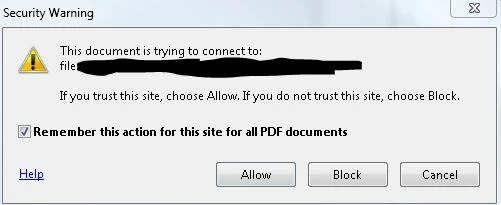
Allow is not working!

Privileged Locations are not working!

This is also not working:
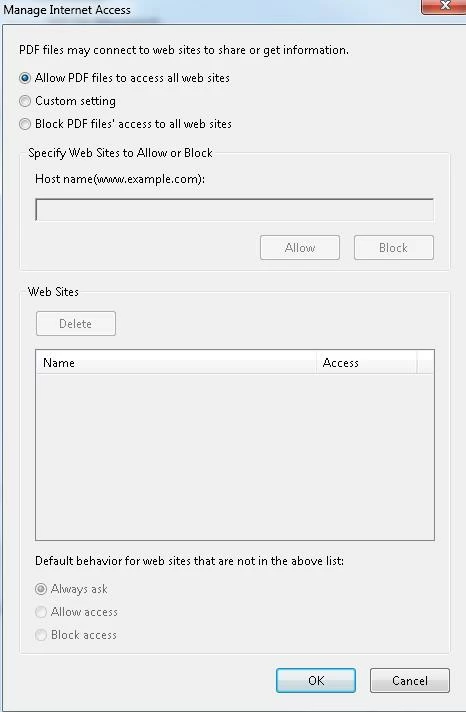
Thanks for every help on this.

This topic has been closed for replies.
Correct answer Adorobat

Hi JShannon,

Have you tried changing the default behavior for internet access from pdf files by clicking edit > preferences > trust manager

internet access from pdf files > change settings > click "allow access" under default behavior for web sites ....

Thanks,

Shivam

6 replies

Participant
February 25, 2021

Go to Edit> Preferences> Security (Enhanced) - and unselect "Run in AppContainer"

Worked for me


Participant
April 7, 2021

Yes this worked....Go to Edit> Preferences> Security (Enhanced) - and unselect "Run in AppContainer"


Thanks...

Participant
March 11, 2023

For me, this didn't work alone, but did work once unselecting "Enable Protected Mode at startup (Preview)" in the same interface. This also automatically disables "Run in AppContainer".

The popup started out of the blue today after years of it never occurring, and I use Adobe for locally linked pdfs for work all the time. Thank you all so much for this solution conversation, I was going crazy!

Participant
May 27, 2018

For those looking for solution, I think this is what solved the same problem for me --- (not sure but its fixed now so feel free to try)---->

Open Adobe Reader DC -> Edit -> Preferences -> Under Application Startup, Click 'Select As Default PDF Handler' ->OK ...it tried installing something and Voila !! Security Warning problem solved!! (for me at least)

P.S.- None of the other methods had worked for me (Win 8, Adobe Reader DC)

Known Participant
December 31, 2018

This thread has been silent for a long time, but I've tried everything that was suggested above and I'm still (more importantly, the readers of my documents) are still seeing these Security Warning messages. It makes for a lousy user experience to have to click on the Allow button for every linked file in the .pdf. Anyone have success with some other fix? Thanks.

Adorobat
Community Manager
AdorobatCommunity ManagerCorrect answer
Community Manager
January 1, 2019

Hi JShannon,

Have you tried changing the default behavior for internet access from pdf files by clicking edit > preferences > trust manager

internet access from pdf files > change settings > click "allow access" under default behavior for web sites ....

Thanks,

Shivam

Participant
August 21, 2017

Hi there,

had the same problem and think I might have found the solution.

Edit-> Preferences -> Secutiry (enhanced)

In the window on the bottom you can add web sites or folder paths to your attachements.

Hope this helped.

Eliska

Bernd Alheit
Community Expert
Community Expert
August 28, 2015

What version of Adobe Acrobat?

Abhishamster
Participating Frequently
August 27, 2015

As the steps that you followed are correct but the application is not giving the desired result so try recreating the application preferences.

You can reset the Acrobat preferences from the registry,


HKEY_CURRENT_USER\Software\Adobe\Adobe Acrobat

but please do take a backup of the key before removing this 'Adobe Acrobat' key. This will revert the application to default settings.

Then make those changes again in the application.

evg23952923
Participant
August 28, 2015

Thanks but still no improvement. I also tried reinstallation of testclient, other useraccounts, no Domain GPO's, other setup files.

AadeshSingh
Community Manager
Community Manager
August 26, 2015

Hey evg23952923,

Try this :-

Open Acrobat, navigate to Edit menu -> Preferences -> Trust manager.

Internet Access from PDF files outside the browser -> Change Settings -> Check-mark "Allow PDF to access all websites" .

Let me know if it resolves your issue.

Regards,

Aadesh

evg23952923
Participant
August 27, 2015

sorry but have you really read my post with screenshot?

Allow PDF... is already set.