
Participant
June 10, 2024
Answered

Disabling cursor suggestion, it is annoying.

  • June 10, 2024
  • 1 reply
  • 471 views

Hi All,


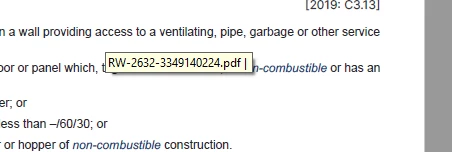
When reading through PDF, if my cursor sits over any text a small yellow box appears with PDF information it, this box covers part of what I am trying to read and then I have to move the cursor or 'click' for it to go away. I hae attached an image. 


It is the same box that appears if I hover over a menu button etc. where it will explain what that button does...this is great for menu buttons and tools but not within the PDF when I am trying to read.


Help would be greatly appreciated.

Correct answer Tariq Ahmad

Hi @Benjamin32746990dzc6,


You can try changing your preference and let us know if that helps.

  • Mac: Acrobat>Preferences, Win: Edit>Preferences
  • Commenting
  • Uncheck "Enable text indicators and tool tips"
  • Click Ok


Re-launch Acrobat and try again. Let us know how it works on your end.

~Tariq

1 reply

Tariq AhmadCommunity ManagerCorrect answer
Community Manager
July 31, 2024

Hi @Benjamin32746990dzc6,


You can try changing your preference and let us know if that helps.

  • Mac: Acrobat>Preferences, Win: Edit>Preferences
  • Commenting
  • Uncheck "Enable text indicators and tool tips"
  • Click Ok


Re-launch Acrobat and try again. Let us know how it works on your end.

~Tariq