
KBS_PDF
Inspiring
July 23, 2020
Answered

Display already filled details in the Dialog box when open again to update the already filled values

  • July 23, 2020
  • 1 reply
  • 616 views

Hi All,


I have developed a popup window(dialog box) which is having four text boxes ..after I fill those I am capturing the values in a calling text box with comma separated values. 

But again if I open the Dialog Box the filled values I want to display in the four text boxes .


Example: If I fill the dialog box of four text boxes with  : 1 2 3 and 4  and click OK button and save the PDF form .. again if I open the PDF and open the above dialog box the previous value 1 2 3 4 should appear. 
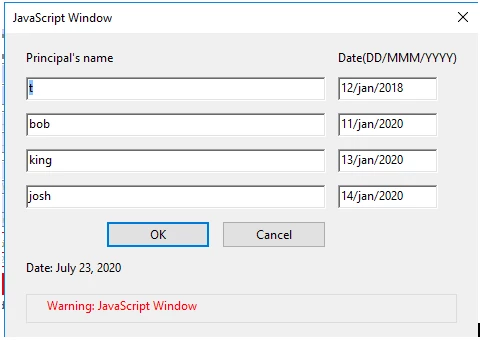


Regards,

Suneel

This topic has been closed for replies.
Correct answer try67

If you're saving the values in a field with a known structure then you can read the value of that field before launching the dialog, parse its contents and then pass it on to the dialog object as variables. Then you use the initialize method of the dialog object to apply them to the fields in it.

1 reply

try67
Community Expert
try67Community ExpertCorrect answer
Community Expert
July 23, 2020

If you're saving the values in a field with a known structure then you can read the value of that field before launching the dialog, parse its contents and then pass it on to the dialog object as variables. Then you use the initialize method of the dialog object to apply them to the fields in it.

KBS_PDF
KBS_PDFAuthor
Inspiring
July 23, 2020

Thank You Try67 for the reply ..


Can you please give me the syntax/psuedo code. I am unable to split the string using the below code.

var prname= this.getField("PRISIGN1").valueAsString;

prname.split(", ")[0] -- it is givng the complete string

prname.split(", ")[1] -- I am expecting the first word ?

prname.split(", ")[2] -- I am expecting the second word after comma?


Regards,

Suneel

KBS_PDF
KBS_PDFAuthor
Inspiring
July 23, 2020

Thank You Try67.. Now I am able to split.. thank you