
Inspiring
March 14, 2025
Question

Display content of a text field as a math equation

  • March 14, 2025
  • 3 replies
  • 838 views

Hello,

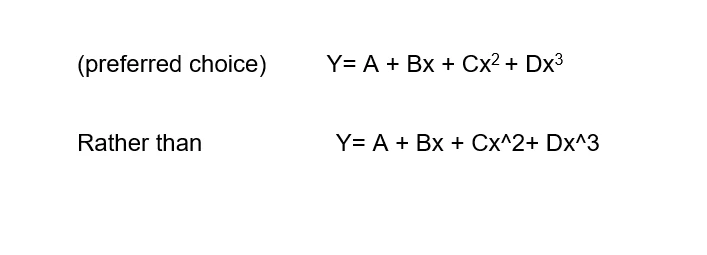
I would like to display content of a text field as a math equation (for example, Y= A + Bx + Cx to power of 2 + Dx to power of 3).  I can enter text as Y = A + Bx + Cx^2 + Dx^3, but I want to know if there is a way to enter as true power like below,


Thanks in advance
 

    3 replies

    Nancy OShea
    Community Expert
    Community Expert
    March 16, 2025

    It's officially referred to as superscript.

    In HTML code, the <sup> tag is used to display superscript.


    <p>This is some normal text, and this is some <sup >superscripted text</sup>.</p>


    Example:


    In Acrobat or InDesign, select the text, then use the 'Superscript' button in either the Character panel or the Control panel.


    Hope that helps.


    Nancy O'Shea— Product User & Community Expert
    Inspiring
    March 16, 2025

    Ms O'Shea,

    Thanks so much for your reply. I am using Adobe Acrobat Pro 10 and created a simple document with a few text fields. A Button field is used to display the Default Value of a text field that I want to display an equation as shown above (preferred choice). I can only enter the equation as a Default Value in the text field (Text Field Properties Screen, Options) as shown below. The content of text field is displayed only as entered in Default Value.

    My inquiry was, is there a way so the content of the text field can be entered and displayed as (preferred choice, real equation).


    Thanks again.


    Joe Tehrani


    try67
    Community Expert
    Community Expert
    March 16, 2025

    You don't actually need superscript for these, as these symbols have their own unicode characters, namely:

    ² : https://www.compart.com/en/unicode/U+00B2

    and

    ³ : https://www.compart.com/en/unicode/U+00B3

    You should be able to copy and paste them directly from here into the field's properties dialog.


    kglad
    Community Expert
    Community Expert
    March 15, 2025

    this an animate question?

    kglad
    Community Expert
    Community Expert
    March 15, 2025

    in the future, to find the best place to post your message, use the list here, https://community.adobe.com/

    p.s. i don't think the adobe website, and forums in particular, are easy to navigate, so don't spend a lot of time searching that forum list. do your best and we'll move the post (like this one has already been moved) if it helps you get responses.


    <"moved from using the community">
    jane-e
    Community Expert
    Community Expert
    March 15, 2025

    @Joe2787079753nv 


    Your post is currently in the Using the Community forum. I see that most of your posts have been in the Acrobat forum. Please confirm if this is an Acrobat issue and we will be happy to move your post.


    Jane