
Participant
September 6, 2012
Answered

document could not be saved error

  • September 6, 2012
  • 30 replies
  • 301098 views

Whenever I go back to a PDF that I created or downloaded, and add comments or highlights, and then try to save it, I get an error message saying "The document could not be saved.  The file may be read only . . ."  But the file is NOT read-only and there are NO security settings.  What gives?
This topic has been closed for replies.
Correct answer johnnieborgie

This has definitely worked for me.

It might not be Adobe's fault after all.

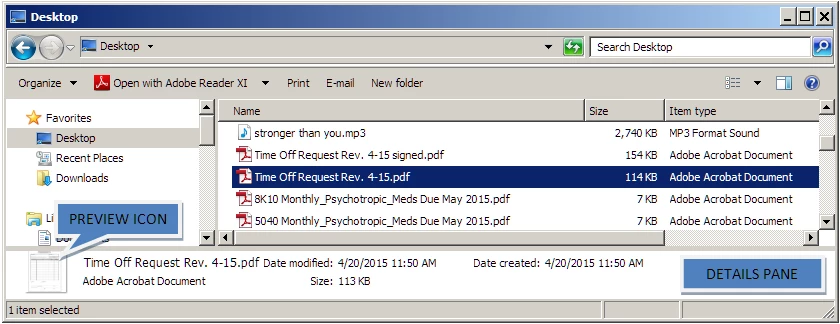
Even when the File Preview disabled, Windows Explorer (Win 7+) has something called the Details Pane that may still be up, it's that blank space that gives you details about the current selected file; its right on top of the status bar.

For some odd reason, Windows creates a preview thumbnail in the details pane for some files: picture files, PDF files, XLS files, PPT files to name a few.

To disable the Details Pane on Windows Explorer, click on Organize > Layout > and click on the Details Pane to make it go away.

30 replies

Participant
March 19, 2015

I'm having the same issue trying to edit a pdf attachment (by adding text) that was sent via Outlook.

Error message:

The document could not be saved. The file may be read-only, or another user may have it open. Please save the document with a different name or in a different folder.

What I have checked/done:

- Preview pane is off

- Explorer is not open

- Trying disabling Javascript for Adobe Acrobat Pro (edit - preferences - Javascript)

- Tried disabling Enhanced security - edit - preferences - Security (enhanced) - clear checkbox for 'enable enhanced security.

I still cannot edit despite what changes are made. Please advise!

March 10, 2015

Another solution I found today - run Adobe Reader in Windows 2000 compatibility mode.  I prefer this work-around rather than turning off security features.

Participant
February 26, 2015

Is anyone from Adobe paying attention here or are they ignoring this?  I have this problem everyday.  I am an architect and I am constantly viewing revised plans and markups and other files and typically have several pdfs and windows explorer windows open when coordinating changes.  It is usally beneficial for me to take several different formats and organize them in a single multi-sheet pdf file, so I am not printing everything out.  Is this a difficult problem?  It certainly causes me time and space on my computer to always, always have to write a new file even when changing something very slight, which we quite often need to do.  I currently use Photoshop Elements, Premier Elements and Acrobat 10.  Please help us with a real solution?

Participating Frequently
March 6, 2015

Are you serious?

Just kidding.

Actually not.

This is what I have a problem with: "Is anyone from Adobe paying attention here or are they ignoring this?".

Care to venture a guess why I'm a tad uncomfortable with that query?

Hint: Has to do with Steely Dan (Are You Reelin' In The Years?)

Geeze... just quit saving PDFs.

Problem solved.

Genius or what?

SmartGreen
Participant
January 23, 2015

Undo javaScript (under preferences...I suspected this all along)

I hope it works for you.

SmartGreen

Participant
February 25, 2015

I have been dealing with for over a year.  I get frustrated trying to find an answer and I quit looking.  Occasionally I will check back with this forum to see if anyone has new suggestions.   I just tried unchecking JavaScript as suggested.  NO Help.  Then I closed the preview window, but no help either.  Then I closed out of Windows Explorer and I was able to save the PDF.  A hell of a sad work around.

Participant
February 7, 2018

2018 and still having this problem

Participant
September 13, 2014

I had this exact same problem on Acrobat Pro XI, Windows 7 64 ... "The document could not be saved. The file may be read-only.. "

Solution for me...

Right Click File in Explorer > Select Properties (Bottom of Context Menu) > General Tab > Attributes, Un-Check Read-Only > Click Apply.

January 16, 2015

Hi

Try this

Try to turn off  the Protected Mode

  In Adobe, go to Edit -> Preferences -> General, uncheck Enable Protected Mode at Startup.

Newer versions

In Adobe, go to Edit -> Preferences -> Security (Enhanced), uncheck Enable Protected Mode at Startup.

I not sure of everything this does but it worked for me for this issue, I did notice that I am no longer asked to replace a existing file when over writing.

Hope this helps

SmartGreen
Participant
January 22, 2015

Ladies & Gents,

Undo javaScript (under preferences...I suspected this all along)

I hope it works for you.

SmartGreen

alcompco
Participating Frequently
August 13, 2014


I am a heavy user of Adobe Acrobat. Every time we edit a PDF file and click on the save button to save the document it comes up with an error message. I spent hours researching the issue and talked to their tech support people and reluctantly followed their suggestions to the effect of closing the preview pane to no avail. The only I have found that works is to close the Windows Explorer window and then save the document. Even if I move the file selector to a different folder or file it does not work.

This absolutely one of the most ridiculous bugs that Acrobat has ever had and it seems they are putting their heads in the sand and not addressing it. THIS IS ABSOLUTELY UNCONSCIONABLE TO HAVE SUCH A BUG ACROSS SO MANY VERSIONS (v. 9-11) OF A SOFTWARE AND NOT HAVING IT FIXED.

Adobe wants people to close the Windows Explorer every time there is a slight change to a PDF file and for us to reopen it over and over again. This is absolutely ludicrous and absurd.

Arrogance and cockiness of Blackberry people cost them their business, deal with this bug before you become another Blackberry.

Here is the error:

meger9996
Participant
July 20, 2014

i get the same error and found out a couple of problematic pages are causing this.

they are usually blank and cant be erased. so after discovering them i extracted all other pages

as different file and saved that.

Participant
March 24, 2014

As of v. XI.0.06, the issue still remains.  The multi-step workaround of renaming, then deleting the original and renaming the newly renamed file the same as the original is something you might expect in DOS back in 1980.  Indeed, the preview pane in windows explorer seems to be he issue in that it feigns an open instance of the file.  Quickest way to solve it is to close that explorer window all together and save your file.

KSobel
Participant
May 21, 2014

I was having the same problem with XI Pro; and turning off the preview pane did not work.  The only solution is, as above, closing the open explorer window.  I am perplexed that something as simple as saving a file would remain an issue for so long for a preeminent, sophisticated company as Adobe.  Come on Adobe!

Participant
June 3, 2014

I'm using a freshly purchased and installed Standard XI version with Windows 7.  My crappy little laptop is completely constipated whenever I ask it to do ANYTHING, so I wasn't surprised to learn that Acrobat working in conjunction with my wimpy OS is fooled into thinking the document is "open" somewhere else when it's just the the preview pane of the Explorer window from which I launched the document.  I, too, was unable to resolve the problem by deactivating the preview pane because all that does it "hide" it.  What worked for me was to click on a different file in the Explorer window, or at least unclick the file in question, so that Acrobat could then feel comfortable overwriting the document as not being otherwise engaged.  I would have never thought of even trying this had it not been for all the posts herein, so thanks for that.

Participant
September 19, 2012

This has been driving me crazy but here's what I found.  It doesn't help to click off the file name, to go up one level in the folder structure, etc.  I did verify that it will finally let me save if I either change drive letters or close the folder that I opened the document from.  I'm new here so does someone from Adobe respond to these or is there an official bug report someplace?

Participant
December 29, 2012

I've found the problem occurs when the preview window open in the folder.  If you turn that off, then you're able to save your PDF file.

You can find the preview window control on the right side of the folder menu bar (circled).  Click on it to toggle.

Participant
September 5, 2013

Did they ever fix this because it was driving me crazy too. Thanks for solving it, but adobe should fix. TJ

Inspiring
September 7, 2012

I assume you are doing this with Acrobat and not Reader. What version of Acrobat and what OS?

roholdenAuthor
Participant
September 7, 2012

Adobe Acrobat X Pro, under Windows 7.

Inspiring
September 9, 2012

Is the PDF on the local drive? Have you updated Acrobat (at 10.1.4)?