


Participant
June 29, 2023
Answered

Does anyone know why the display in Acrobat Prepare Forms is creating ghosted duplicate fields

  • June 29, 2023
  • 1 reply
  • 695 views

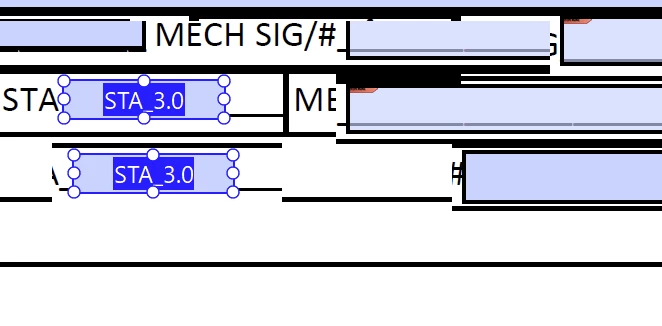
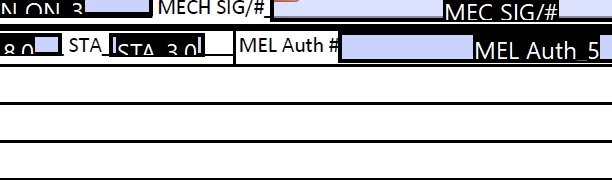
I've been running into this problem lately while in Prepare Form, when I click on a field to change the size or properties it is creating duplicate sections of the page and fields, but they are not really there. It is a display issue. When I change the display from 150% back to 100%, the display corrects itself.

This screen shot is at 150% magnification and display a ghosted STA 30 field and text that is misplaced.
Look at the changes in the horizontal lines. The display issue is a combination of fields and background text.
Here is at 100% and displaying correctly.
I recently had the ram upgraded on my work computer from 16 gb to 24. (one 16 gb and one 8 gb).

Could this have anything to do withit?

This topic has been closed for replies.
Correct answer Karl Heinz Kremer

I doubt that the memory upgrade is causing this. The component on your computer that is more likely to be involved is your video card. Are there any driver updates for your video adapter available? If so, that's the first thing I would do. 

1 reply

Karl Heinz  Kremer
Community Expert
Karl Heinz KremerCommunity ExpertCorrect answer
Community Expert
June 29, 2023

I doubt that the memory upgrade is causing this. The component on your computer that is more likely to be involved is your video card. Are there any driver updates for your video adapter available? If so, that's the first thing I would do. 

Participant
July 31, 2023

Thank you Karl, there were updates waiting to be installed. It seems to be working correctly now.

Karl Heinz  Kremer
Community Expert
Community Expert
August 3, 2023

Thanks for the update. Hopefully it will help somebody else in your situation.