
Participant
June 27, 2016
Answered

Downloading Acrobat pro 11 with serial number

  • June 27, 2016
  • 1 reply
  • 85230 views

I am trying to download Adobe Acrobat pro  v 11.  The text indicates I will need the serial number (which I have), but when I click on Acrobat XI pro installer there is no place for me to enter the serial number, and I am not able to get beyond that step.
Correct answer Adorobat

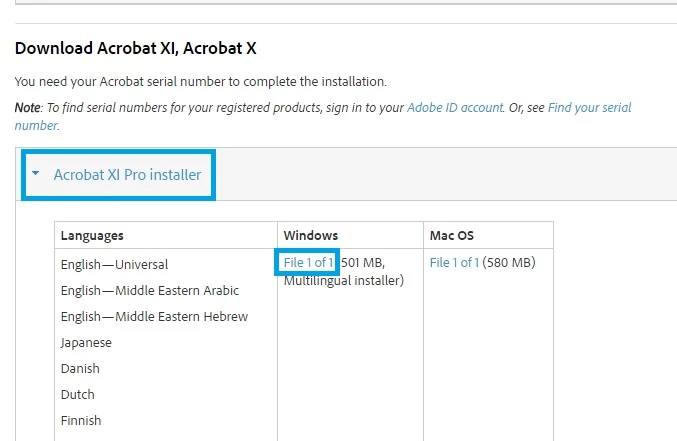
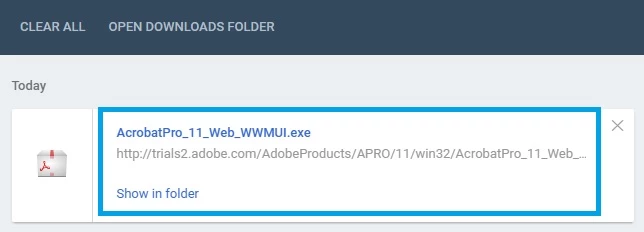
Click on Acrobat XI Pro Installer>select your operating system(Windows/Mac)>click File 1 of 1. It will begin download, when download finish ,press Windows+J key together on your keyboard to see the downloads, click on AcrobatPro .... .exe and begin the installation.

Below are the screenshots:

1 reply

Adorobat
Community Manager
Community Manager
June 27, 2016

Hi MrWillmuth ,

Could you please tell if you see any error message there?

Also try to download Acrobat Pro Xi from here:Download Pro or Standard versions of Acrobat DC, XI, or X

Thank You!

Shivam

Participant
June 27, 2016

When am on the Download Pro or Standard

<https://helpx.adobe.com/acrobat/kb/acrobat-downloads.html#download_11_10>versions

of Acrobat DC, XI, or X

<https://helpx.adobe.com/acrobat/kb/acrobat-downloads.html#download_11_10>

page,

and scroll down to where is says "Download acrobat X11, Acrobat X" there is

text that says I will need my serial number (which I have), but when I

click on Acrobat X11 pro installer, I only see columns labeled "languages"

" Windows" and "Mac Os", the is no place to enter my serial number. Please

help me get to the next step.

Adorobat
Community Manager
AdorobatCommunity ManagerCorrect answer
Community Manager
June 27, 2016

Click on Acrobat XI Pro Installer>select your operating system(Windows/Mac)>click File 1 of 1. It will begin download, when download finish ,press Windows+J key together on your keyboard to see the downloads, click on AcrobatPro .... .exe and begin the installation.

Below are the screenshots: