
April 16, 2017
Answered

Drop down list and calculations

  • April 16, 2017
  • 2 replies
  • 10878 views

I have a question I haven't seen before. I have created a form that uses a drop down list to populate a price field. This field is then multiplied by my quantity field to get a result. Like this:

User selects A the price becomes $1.00. It is multiplied by quantity and gives the correct result.

User selects B the price becomes $2.00. It is multiplied by quantity and gives the correct result.

User selects C the price becomes $3.00. It is multiplied by quantity and gives the correct result.

This is basically hard coded in my mind. Now I need to get away from that by making price fields such as Price 1, Price 2, Price 3 and so on for when pricing changes.

When I select A the price that is multiplied by quantity is Price 1.

When I select B the price that is multiplied by quantity is Price 2.

When I select A the price that is multiplied by quantity is Price 3. and so on.

I'm completely new to this and java script so any help is appreciated. Be gentle, I'm old!

Thanks,

Chant
This topic has been closed for replies.
Correct answer try67

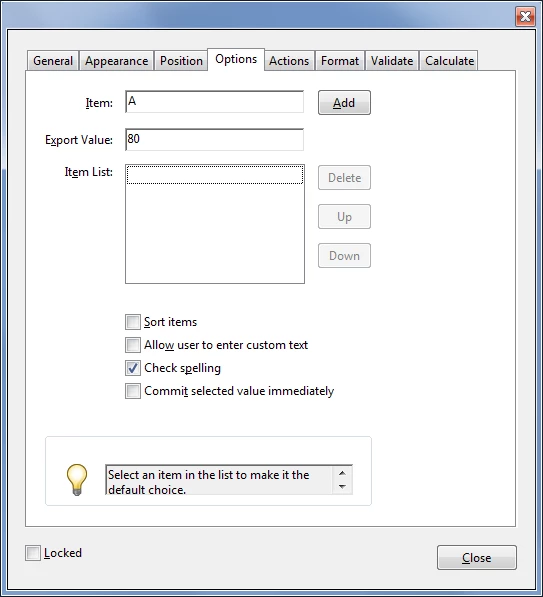
When you add items to a drop-down field there are two fields you can fill in: Item and Export Value. The first is mandatory and is the display value of that item. The second is optional and is the actual value the field has when that item is selected. So if you enter both the user will only see the display item, but you will be able to use the export value in your calculations. It should look something like this:

2 replies

April 17, 2017

Try67,

I guess I spoke too soon and didn't use more than one check. I can't get it to work - at all now. I have a drop down and it shows the 'products' by name called Item1. Under that I filled in the name of the price field for the first item - A would be 'price1'. I then highlighted the second item in the list and associated it - B with 'price2' and so on until they are all filled. I have the total field using the Qty * Item1. I get 0.00 regardless of what I select in the dropdown. What am I missing?

Sorry for taking up so much of your time.

Thanks,

Chant

try67
Community Expert
Community Expert
April 17, 2017

Did you just enter "price1", "price2", etc. as the export value and that's it? Because that's not going to work. You need to then use a script that takes that value and accesses the field with that name to retrieve the actual value from it.

April 17, 2017

try67,

Yes I did put in Price1, Price2 and so on. I have no idea how to do what you're tell me! What would the script look like and where would I put it?

Sorry I'm so dense but this is my very first attempt to make a form.

Thanks,

Chant

try67
Community Expert
Community Expert
April 17, 2017

So "A", "B" and "C" are product names? If so, you can use a drop-down field with the name of the product as the display value and the price as the export value, and then just multiply that by the quantity to get the total.

April 17, 2017

try67,

Yes, the A,B,C are in a drop down list. Currently I have that list using this under the FORMAT tab:

if(event.willCommit)
{
console.println(event.value);
switch(event.value)
{
   case "A":
    this.getField("Price1").value = 80;
    break;
   case "B":
    this.getField("Price1").value = 100;
    break;
   case "C":
    this.getField("Price1").value = 120;
    break;
   case "D":
    this.getField("Price1").value = 150;
    break;
   case "E":
    this.getField("Price1").value = 200;
    break;

   default:
    this.getField("Price1").value = 0;
    break;

}
}

but now I need to make price fields that can be changed instead of having them in the drop down list. Could you please explain how I do that using the price as an export value? I have no clue how to do that. Also, there are several different prices we're talking about not just one to use for all fields as you can see by the above script. If you can guide me with some kind of example I'd appreciate it.

Thank you,

try67
Community Expert
try67Community ExpertCorrect answer
Community Expert
April 17, 2017

When you add items to a drop-down field there are two fields you can fill in: Item and Export Value. The first is mandatory and is the display value of that item. The second is optional and is the actual value the field has when that item is selected. So if you enter both the user will only see the display item, but you will be able to use the export value in your calculations. It should look something like this: