
Known Participant
October 4, 2024
Answered

Drop-down List Won't Keep Selection

  • October 4, 2024
  • 1 reply
  • 1128 views

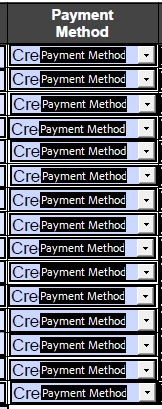
Hello!  I'm working on an Adobe Form that has a vertical column of 15 cells, each having a drop-down list of 5 different selection options. When the form is tested, each time a selection is made in the next subsequent drop-down list below it, ALL 15 drop-down selections change to the new selection just made. 


The form documents money collected. The drop-down selections for the payment type/method are 1. "Select Method" (set to default in case they are more lines than needed i.e. less than 15 individual payment were collected ), 2. "Cash", 3. "Check", 4. "Credit Card", 5. Money Order. "Commit selected value immediately" is selected and all of the drop-down cells are locked. TIA for your help!!
This topic has been closed for replies.
Correct answer PDF Automation Station

Yes, each of the 15 fields is titled "Payment Method". 


Fields with the same name can only have 1 value.  When you change any of them, all the others will change.  Rename them Payment Method1, Payment Method2...Payment Method3 and that should fix it.

1 reply

PDF Automation Station
Community Expert
Community Expert
October 4, 2024

Would the dropdown fields happen to have the same name?  If not, please upload the form.

Known Participant
October 4, 2024

I'm not positive I understand you. All drop-down list selection options are exactly the same. (For every payment collected, the payment method has to be selected.)

PDF Automation Station
Community Expert
Community Expert
October 4, 2024

Not the list selections.  The field names - are they the same field names?